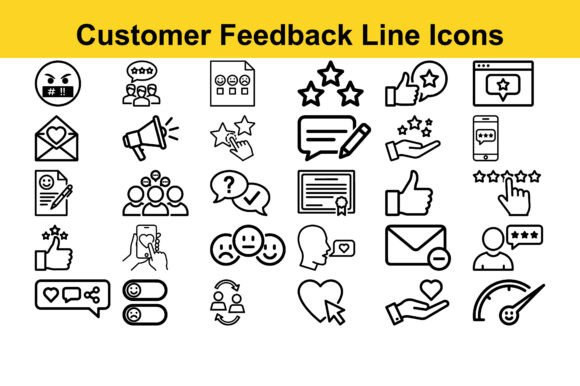
Customer Feedback Line Icons – Evaluating a Professional Vector Icon Set
Visual communication relies heavily on clear, immediate symbols. In digital products, presentations, and brand materials, icons serve as shorthand for complex ideas. The Customer Feedback Line Icons set positions itself as a solution for professionals who need clean, scalable visuals without the overhead of designing from scratch. This article examines what this icon set offers, its practical strengths, realistic use cases, and who stands to benefit most from incorporating it into their workflow.
What Makes Customer Feedback Line Icons Worth Considering
At its core, Customer Feedback Line Icons is a curated collection of 30 vector-based symbols designed to represent essential themes with clarity and precision. The set focuses on a minimal line style that avoids unnecessary ornamentation, letting the meaning of each icon come through at a glance. This approach is especially valuable in environments where users encounter dense information and need visual cues that support rather than distract.
The icons are provided in three common formats: JPG for quick raster use, EPS for compatibility across vector software, and AI for direct editing in Adobe Illustrator. This format variety reduces friction when integrating the icons into existing projects, regardless of the tools you prefer. The ZIP bundle ensures easy organization and access.
What distinguishes this set from generic icon collections is the deliberate design consistency. Each icon shares a uniform stroke weight, balanced visual structure, and restrained aesthetic. This coherence matters when icons appear together in a dashboard, interface, or infographic. Inconsistent styling across icons can break the visual rhythm and reduce the professionalism of the final output.
Design Quality and Visual Consistency
The line style used in Customer Feedback Line Icons is minimal but not simplistic. Each icon achieves a balance between abstraction and recognizability. For example, icons representing feedback, analytics, strategy, or planning must convey their concept without relying on labels or text. A well-designed line icon for "customer feedback" might show a speech bubble with a star or a human silhouette and a comment – the set handles these visual metaphors with restraint.
Consistent stroke thickness across all 30 icons is a practical advantage. When you scale an icon set with varied stroke weights, some icons may appear heavier or lighter than others, creating an uneven visual hierarchy. This set avoids that problem by maintaining uniform stroke properties throughout. The line endings, corner treatments, and spacing also appear standardized, which adds to the polished, professional look.
Another consideration is the scalability of vector formats. Because the icons are fully vector-based, they remain sharp at any size – from a 16-pixel interface element to a large-format presentation slide. This flexibility eliminates the need to source separate icon files for different resolutions or contexts.
Practical Value in Real-World Use
For professionals who regularly create presentations, dashboards, or infographics, the Customer Feedback Line Icons set offers a time-saving resource. Instead of searching for individual icons across multiple libraries and adjusting them to match a consistent style, you have a ready-to-use collection that works together visually.
Consider a typical scenario: you are building a quarterly business review slide deck. You need icons for revenue growth, customer satisfaction, product feedback, team performance, and strategic goals. Using this set, you can pull five icons that share the same line style, stroke weight, and visual language. The result is a cohesive slide that communicates data points with supporting visuals, without looking mismatched or cluttered.
In UI/UX design, these icons can populate navigation menus, feature lists, notification indicators, or empty state illustrations. Their minimal line style integrates well with modern interface trends that favor clean layouts and ample whitespace. The icons do not compete with text or data; they complement it.
For social media graphics or marketing materials, the icons can serve as visual anchors in carousel posts, infographics, or educational content. The monochrome line style also adapts easily to brand color schemes by recoloring the strokes or applying fills in compatible software.
Strengths and Limitations
One of the main strengths of Customer Feedback Line Icons is its focus on a specific niche – customer feedback and related business themes. Rather than offering thousands of generic icons with inconsistent quality, this set provides a targeted collection where each icon is thoughtfully designed. This makes it particularly useful for professionals who work in customer experience, product management, marketing, or business strategy.
The inclusion of editable AI source files is a notable advantage for designers who need to modify icons – changing line thickness, adding fills, or adjusting proportions. EPS files offer broad compatibility with vector editing software, while JPG files provide immediate raster use for quick prototyping or non-design applications.
However, there are practical limitations worth noting. With only 30 icons, the set covers a specific range of concepts. If your project requires icons for unrelated categories – such as healthcare, transportation, or education – this set may not meet those needs. The line style, while clean and professional, may also feel too restrained for projects that require more illustrative, playful, or textured visuals. Similarly, if you need a large icon library with hundreds of variations, this set is best seen as a supplementary resource rather than a primary one.
Another consideration is that JPG files, while convenient for raster use, do not support transparency natively. For web or interface design, you may prefer to work directly with the vector formats (EPS or AI) to export transparent PNG files as needed.
Who Benefits Most from Customer Feedback Line Icons
Professionals who will find the most value in Customer Feedback Line Icons are those who regularly communicate business insights, customer data, or strategic plans through visual media. This includes:
- UI/UX designers building interfaces that require clean, recognizable icons for dashboards, analytics panels, or user feedback sections.
- Marketing and content creators who need professional icons for social media posts, blog graphics, email campaigns, or branded presentations.
- Product managers and business analysts who present data, customer feedback summaries, or project roadmaps and want consistent visuals that reinforce key themes.
- Freelancers and small agency owners who need reliable, ready-to-use assets for client work without the overhead of designing icons from scratch.
- Educators and trainers who create instructional materials, course slides, or handouts that benefit from clear, minimal visuals.
- Entrepreneurs and small business owners who want to improve the visual quality of their pitches, reports, or website without hiring a dedicated designer.
The set is also useful for anyone who values time efficiency. Instead of browsing icon libraries for hours, you have a curated set that addresses common business and feedback-related topics directly.
Usability and Workflow Integration
Integrating Customer Feedback Line Icons into your workflow is straightforward. The ZIP bundle contains organized folders for each format, making it easy to locate the file type you need. EPS files can be imported into Adobe Illustrator, Affinity Designer, CorelDRAW, or other vector applications that support Encapsulated PostScript. AI files open directly in Adobe Illustrator and allow full editing of paths, strokes, and colors.
If you are not a designer, the JPG files provide a quick way to drop icons into documents, slides, or web graphics. However, for the best results and flexibility, using the vector formats is recommended. You can recolor icons to match brand guidelines, adjust stroke thickness for better visibility at small sizes, or combine multiple icons into composite graphics.
The consistent visual style also means you do not need to spend additional time aligning or adjusting icons to look cohesive. This reduces the iteration cycle when building mockups or draft layouts.
Long-Term Value and Reliability
Vector icon sets like Customer Feedback Line Icons offer good long-term value because the files are format-agnostic and resolution-independent. As your projects evolve, you can reuse the icons across different mediums without degradation. The EPS and AI formats will remain editable and scalable for years, assuming you maintain compatible software.
The set’s focused scope also means that if you regularly work on customer feedback, strategy, or analytics projects, the icons become a repeatable resource. Over time, the upfront cost and time to learn the set are offset by the convenience of having consistent, professional visuals ready when needed.
One practical recommendation is to create a master library file (e.g., an Adobe Illustrator file with all icons organized on separate artboards) so you can easily access, preview, and export icons as needed. This transforms the set from a static download into a dynamic asset library.
Final Observations
The Customer Feedback Line Icons set delivers exactly what it promises: 30 clean, minimally styled vector icons focused on themes relevant to business, feedback, strategy, and digital design. Its strengths lie in design consistency, format flexibility, and ease of integration into professional workflows. The limitations are inherent in any narrow collection – the number of icons and thematic range may not suit all projects – but for the intended use cases, the set performs reliably.
Professionals who need quick, polished visuals for presentations, interfaces, or marketing materials will find this set practical and efficient. It is not a replacement for a massive icon library, but it serves a specific purpose well. If your work involves customer feedback, analytics, planning, or branding, and you value visual coherence without extra effort, this icon set is worth incorporating into your resource toolkit.