Delivery Driver Silhouette Pack
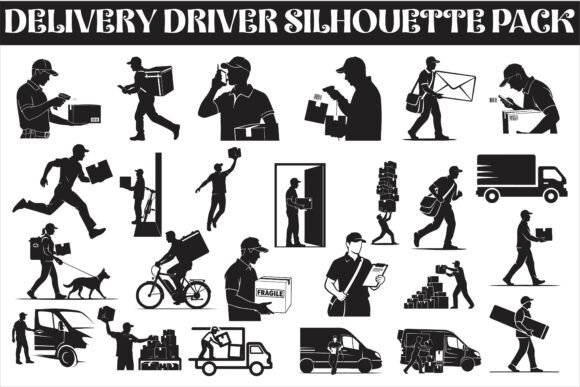
If you’ve ever tried to find a clean, action-packed graphic of a courier in mid-stride or a delivery driver carefully setting down a package, you know it’s not as simple as it sounds. Stock photos can feel cluttered, and illustrations often miss the energy of real logistics work. That’s where the Delivery Driver Silhouette Pack comes in, a versatile set of bold black silhouettes that capture everything from a rider balancing a takeout bag on a scooter to a delivery van pulling up to a curb. These aren’t just generic figures; they’re dynamic poses designed to feel familiar to anyone who’s ever tracked a package or flagged down a courier.
What makes this set stand out is how it leans into the everyday motions of delivery work. You get walking carriers, people clutching boxes in different ways, workers pushing carts through what looks like a warehouse aisle, and even the quiet moment of a doorstep drop-off. The minimalist style means each silhouette is clear at a glance, whether it’s printed on a massive poster or shrunk down to an app icon. And because it comes in 25 EPS, JPG, PNG (with transparent backgrounds), SVG, PDF, and AI files, you’re not locked into any one workflow.
Real-world uses that go beyond the obvious
People often assume a silhouette pack like this is just for logos or website headers. But let’s look at how different professionals might actually put it to work.
- Restaurant owners and ghost kitchen operators: If you run a delivery-only kitchen, your entire brand revolves around the moment food travels from your counter to someone’s door. Using one of the scooter rider silhouettes on your takeout bags or as a social media avatar instantly tells customers what you do. The transparent PNG files let you drop the rider directly onto a photo of your actual packaging for a quick menu flyer.
- Graphic designers working on logistics pitches: When you’re designing a proposal for a new courier partnership, you need visual aids that feel modern but not overly complex. The van-driving silhouette works great as a hero image on a slide, and you can layer it with a faint city skyline made from repeated silhouettes from the pack. Because all vectors match the same black silhouette style, you can build a cohesive look without spending hours sourcing different assets.
- UI and app designers: Delivery apps need tiny icons that are instantly readable. Package drop-off, in-transit, and out-for-delivery statuses become much clearer when you use the exact walking or cart-pushing silhouettes from this pack. The SVG files scale perfectly on Retina displays, and you can import the EPS into Figma or Sketch with no quality loss. One practical trick: use the doorstep drop-off silhouette as a custom marker on a map view instead of a standard pin.
- Cricut and cutting machine enthusiasts: Silhouette packs are a goldmine for crafters who make custom decals. The bold black shapes cut cleanly on vinyl, so you can create laptop stickers that say “priority delivery,” car decals for a small courier business, or even layered T-shirt designs. The AI files are especially helpful here because you can edit the shape slightly to add a banner or combine two silhouettes into a larger scene.
Industries that get the most mileage from delivery silhouettes
While e-commerce is the obvious match, these silhouettes pop up in some surprising places.
Transport and mobility reporting: Infographics about last-mile delivery efficiency, electric scooter adoption, or urban traffic patterns often need visual metaphors. A single silhouette of a courier walking with a package can represent “final meter” delivery in a way that feels human rather than abstract. You could pair it with a simple bar chart to show how many steps delivery workers take in a day.
Warehouse safety and signage: Those generic “caution” signs with a person walking can be replaced with the actual pushing-cart silhouette from the pack to make instructions context-specific. It’s a small detail, but employees in a fulfillment center will immediately recognize the posture and relate to it. Print them as large decals for doors or use the PDF files for laminated safety posters.
Co-working spaces and small logistics hubs: If you manage a shared workspace that also handles package reception, you can use the drop-off silhouette as a sign near the mailroom. It’s more inviting than a block of text. The cart-pushing silhouette could also mark the spot where tenants should leave outgoing parcels.
Strengths that make this pack practical
The first thing you notice is the variety of poses. There’s no single “generic delivery person” repeated in different sizes. Each file captures a distinct motion, which gives you flexibility. Need to show speed? Use the scooter rider. Need to show weight or effort? The person holding a large box with both arms works better. This nuance matters when you’re trying to tell a visual story without words.
Another strong point is the file format abundance. While many graphic sets give you just SVG and PNG, having EPS, AI, and PDF means you can hand these off to print shops or use them in Adobe Illustrator without conversion issues. The transparent PNGs are saved with anti-aliased edges, so they don’t look jagged on light backgrounds. That’s a small but noticeable quality when you’re placing a silhouette inside a colored block on a brochure.
The minimalist black design is intentional: it reduces cognitive load. Viewers instantly see “delivery” without being distracted by clothing details, logos, or backgrounds. It also makes the silhouettes easy to recolor, though the bold black works well for most print applications.
What to keep in mind before using them
Every asset has limitations, and being upfront about that saves you trial and error. The silhouettes are flat black, which is great for contrast but might not fit a brand that relies heavily on gradients or colorful illustrations. If your app has a dark mode, you’ll need to invert the colors to white or a light shade. The PNG files have a transparent background, but the JPGs come with a white background, so factor that into your workflow if you only grab the JPGs.
Also, because these are true silhouettes, they don’t include any interior lines or facial features. That’s a plus if you want clean cut lines for vinyl or screen printing, but it might feel too minimal if you need detailed interaction between the delivery person and a customer. The doorstep drop-off silhouette, for instance, shows a person standing at a door, but you can’t tell if they are handing off or just walking up. Context from text or surrounding design will clarify that.
Another practical consideration: if you’re scaling the silhouettes very small for UI icons, test how they look at 24×24 pixels. The more complex poses, like the pushing-cart or van-driving silhouettes, may lose some legibility when tiny. The walking silhouettes tend to work best at small sizes because the posture is simpler. You can always edit the SVG in Illustrator and remove unnecessary curves if needed.
Real examples of how people combineware these with other elements
One designer I know created a set of warehouse floor guides by printing the cart-pushing silhouette on large adhesive vinyl strips and placing them on concrete floors every few meters. It sounds odd, but it gave employees a visual cue for cart pathways without painting permanent lines. The silhouette was from this pack, scaled up to 40 cm tall, and the crisp edges held up well on the matte vinyl.
A small e-commerce brand used the walking courier silhouette on their thank-you cards that go inside packages. They printed it in gold foil on kraft paper, and the lack of details made the foil stamp look elegant. They mentioned that the simplicity of the shape was key—any extra lines would have blurred during hot foil stamping.
Another use that may not be obvious: event signage. A logistics conference used the van-driving silhouette as the main graphic on their directional signs. They paired it with the words “Exhibition Hall” in bold sans-serif. The silhouette oriented attendees quickly because it connected visually to the theme of delivery and transportation.
Scenarios where the pack really shines
When you need a consistent visual language across print and digital. Because the same silhouettes exist as EPS for print and SVG for web, you can keep the exact same shape for a truck wrap and a mobile banner. That consistency builds recognition for small courier businesses that might not have a full design team.
When you’re working on a tight deadline. Having 25 ready-to-use silhouettes means you don’t need to draw or commission custom illustrations. You drop them in, adjust size, and move on. The variety gives you options to pick the pose that best matches the context without compromising on relevance.
When you want to communicate delivery speed. The scooter rider silhouette naturally implies quicker transport compared to the walking carrier. You can use that contrast in a comparison infographic or on a app loading screen to show “express” vs “standard” delivery.
When you need something that cuts cleanly. Cricut users in particular appreciate how the SVG files have paths that aren’t overly fragmented. The door-step drop-off silhouette cuts beautifully on standard vinyl sheets because there are no tiny islands or gaps that would fall out during weeding.
Final thoughts on applying these silhouettes effectively
If you decide to use the Delivery Driver Silhouette Pack, start by matching each pose to a specific interaction. Rather than using just any silhouette, think about what your audience needs to understand. Are they tracking a package that’s “out for delivery”? Use the van-driving silhouette. Is the status “package left at door”? The doorstep drop-off is more accurate than a generic walking figure. That kind of intentionality makes your graphics feel smarter and more professional.
Also, don’t ignore the possibility of layering. Because the silhouettes are solid black, they work well as foreground elements over photographs of city streets or busy loading docks. You can also duplicate them, change opacity, and create ghosted versions for backgrounds. The EPS and AI files are fully editable, so you can rotate, flip, or scale individual parts if needed.
The pack covers common delivery scenarios, but it doesn’t include things like delivery drivers on bicycles or electric skateboards. If your brand specifically uses those vehicles, you might need to supplement the set. However, for the vast majority of standard courier, food delivery, and logistics applications, the poses here give you a solid foundation that covers walking, cart pushing, scooter riding, van driving, and doorstep drop-offs.
By prioritizing use cases that feel real and mentioning how actual professionals have applied these silhouettes, it becomes more than just a file download—it becomes a tool that solves visual communication problems. That’s the kind of resource that fits naturally into any project where delivery is central, whether you’re a designer, a business owner, or a crafter turning a silhouette into a sticker.