Smart Home Visuals for Modern Design
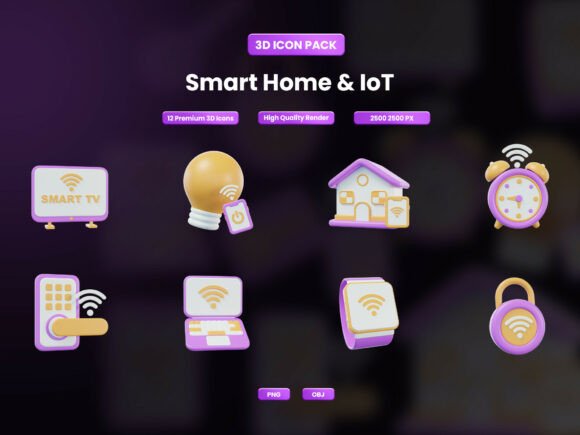
Visualizing the connected home goes beyond simple diagrams or flat icons. The devices that power modern living deserve imagery that feels both sophisticated and approachable. The Smart Home IoT 3D Icon Pack delivers exactly that. It offers a curated set of 12 high-resolution assets that blend essential smart home hardware with futuristic metaverse elements. Designed in a chubby, smooth 3D style, this collection aims to make complex technology feel friendly and accessible. For anyone working with tech brands, IoT applications, or home automation content, these visuals offer a ready-to-use library that can elevate presentations, interfaces, and marketing materials.
A Closer Look at the Collection
This pack covers two distinct yet complementary visual domains. The first group focuses on practical, everyday smart home devices. You get a smart light bulb, a modern thermostat, a security camera, a WiFi router, a smart plug, and a voice assistant hub. These are the building blocks of any smart home ecosystem. The second group introduces objects often tied to the broader tech and metaverse conversation: a VR headset, an avatar, a crypto coin, a hologram, and a portal. This mix makes the pack useful not just for documenting current home setups but also for discussing future trends and digital-physical convergence.
Each file is a PNG with a transparent background sized at 2500x2500 pixels. This resolution is generous enough for crisp displays on high-DPI screens and provides enough detail for small to medium print applications. The consistent lighting, color palette, and soft shading across all twelve icons mean you can drop them into a project without spending time matching styles. The aesthetic itself is deliberately warm and inviting, moving away from cold, technical renders toward something that feels more human and approachable.
Who Gains the Most from This Icon Set?
Different professionals and creators will interact with this pack in distinct ways. Understanding how it fits into specific workflows helps you decide if it matches your own project requirements.
UI and UX Designers Building IoT Interfaces
If you design dashboards for home automation or mobile apps for smart devices, consistency is non-negotiable. Having a set of icons that share a uniform perspective and rendering style saves hours of hunting through separate sources. You can use the smart light, plug, and thermostat icons directly in a Figma or Sketch prototype to communicate the app's functionality clearly. The high resolution means they work well as splash screens or feature graphics. One consideration is the PNG format. For vector flexibility and infinite scalability, some designers may need to convert or trace these. If your workflow relies heavily on SVG for responsive web design, the static nature of these files is a trade-off to weigh against their polished, ready-to-use quality.
Content Creators and Tech Marketers
Engaging blog posts and social media content about smart homes need strong visual hooks. A listicle comparing the best smart thermostats becomes far more compelling when a custom 3D icon sits next to each product name. The transparent background makes it easy to overlay these icons on branded images, video thumbnails, or infographic sections. The inclusion of metaverse objects like the hologram and VR headset gives you visual tools to write about future tech trends or the evolution of connected living, keeping your content visually fresh even when discussing abstract concepts.
Educators and eLearning Developers
Teaching the Internet of Things or smart home technology to students requires clarity. Abstract concepts become concrete when students see a friendly, detailed icon of a router or a security camera. These assets are excellent for slide decks, interactive course modules, and printed handouts. The consistent style adds a layer of professionalism to educational materials without making them feel sterile. An instructor can build a network diagram using the router, plug, and camera icons to visually explain how devices communicate, making the lesson more accessible for visual learners.
Smart Home Enthusiasts and Hobbyists
If you manage your own smart home setup, you might enjoy customizing dashboards or planning future upgrades. While this pack does not replace the icon sets in platforms like Home Assistant, it provides high-quality standalone assets for personal project boards, mood boards, or home network documentation. The unique chubby style can add a distinct character to your personal project files or help you visualize a dream setup before purchasing specific hardware. For personal use, the high resolution ensures your planning documents look sharp on any screen.
Entrepreneurs and Smart Home Service Providers
Small business owners who install or consult on smart home systems need to build trust and convey expertise visually. Proposals, service menus, and website pages benefit from imagery that looks custom-made. Using these consistent, modern icons across your client-facing materials signals attention to detail. Whether you are explaining the benefits of a smart thermostat in a presentation or showing a client the components of a security system on a brochure, having a cohesive visual library helps you communicate more effectively and professionally.
Evaluating the Pack for Your Specific Needs
Identifying whether this specific collection matches your project involves looking at a few key factors. The strength of the pack lies in its consistent, friendly aesthetic and high-resolution output. It is ideal for projects where a modern and approachable look is prioritized over a purely corporate or flat design language.
Quality and resolution are clearly strong points. The 2500x2500 pixel size provides beautiful clarity for digital interfaces, app store previews, and print items up to medium sizes. The transparent background adds to the plug-and-play convenience. However, if your primary need is for a vast library of hundreds of diverse, scalable vector icons, this small curated set might serve better as a visual accent rather than a complete system. It is designed for quality and specific relevance rather than quantity.
Style coherence is where this pack truly shines. The chubby smooth 3D style is very distinct. It creates an emotional tone that is friendly and inviting. This makes it a great fit for consumer-facing apps, educational content for general audiences, and lifestyle blogs. If your brand or project requires a highly technical, industrial, or minimalist aesthetic, these icons may clash with your existing visual language. Evaluating the stylistic fit is crucial before purchasing.
From Concept to Creation: Practical Examples
Seeing how these assets work in real scenarios helps clarify their value. Here are a few ways different users might put the pack to work:
- Dashboard prototyping: A designer working on a smart home app can assemble the smart lights, thermostat, voice assistant, and smart plug icons onto a dark-themed UI mockup within minutes. The consistent lighting across the assets ensures the prototype looks polished and presentable for client review or user testing.
- Feature article illustration: A tech blogger writing an article titled "The Five Devices That Complete a Smart Home" can use the router, camera, thermostat, light, and plug icons to create a structured, visual list. This improves reader engagement and breaks up long text sections without needing stock photography.
- Educational infographic: An instructor building a poster for a "Home Automation 101" workshop can arrange the icons in a flowchart showing how devices connect to the WiFi router and voice assistant. The friendly style makes the topic less intimidating for adult learners who may be new to technology.
These examples highlight how the same set of assets adapts across different mediums and objectives. The core value is the time saved and the polish gained by starting with high-quality, thematically unified visuals.
Ultimately, this pack serves as a practical creative asset for anyone who regularly needs to visualize smart home technology in a modern, approachable way. It bridges the gap between generic icon sets and custom 3D modeling, offering a convenient middle ground for professionals and creators who value both quality and efficiency. By carefully evaluating your project's needs for style, format, and content, you can determine if this collection aligns with your goals and helps you communicate your ideas more clearly.