50 Tools Flat Multicolor Icons: A Practical Icon Set for DIY and Construction Projects
Icon sets are easy to overlook when planning a project, yet they often determine how quickly a design communicates its purpose. The 50 Tools Flat Multicolor Icons set addresses a specific need: providing clean, recognizable tool icons that work across multiple formats and platforms. Whether you are building a hardware store website, producing educational content about home improvement, or designing an app for contractors, having a cohesive set of tool icons can save hours of custom illustration work.
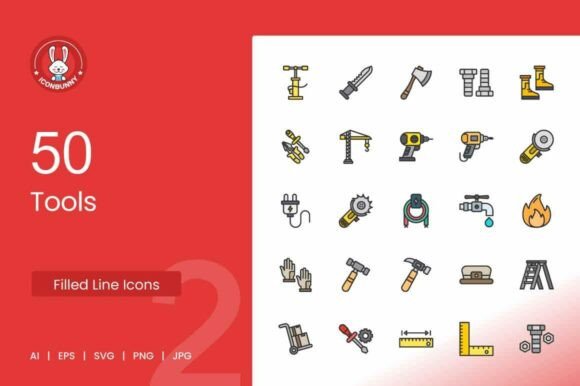
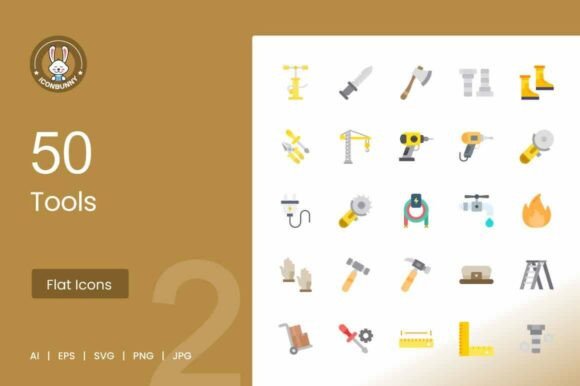
This collection delivers exactly what the name suggests—50 tool-themed icons rendered in a flat, multicolor line style. The set includes hammers, screwdrivers, wrenches, pliers, saws, drills, paint brushes, measuring tools, bolts, nuts, toolboxes, and other essential items commonly associated with DIY, construction, and repair tasks. Each icon is available in AI, EPS, SVG, PNG, and JPG formats, with a resolution of 1024×1024 pixels at 72 DPI. The files come organized in clearly named layers, making customization straightforward in applications such as Illustrator, Canva, Figma, Sketch, and similar vector editing tools.
What Makes This Icon Set Worth Considering
The primary strength of the 50 Tools Flat Multicolor Icons set lies in its balance between detail and simplicity. The line style keeps each icon visually clean, while the flat multicolor approach adds enough differentiation to make individual tools easy to identify at small sizes. This is particularly important for UI and UX work, where icons often appear in navigation menus, toolbars, or alongside instructional text. A wrench and a pair of pliers, for instance, can look confusingly similar when rendered in monochrome or overly minimal styles. The use of distinct colors here helps mitigate that confusion without resorting to excessive detail.
Another practical advantage is the file variety. By including AI, EPS, SVG, PNG, and JPG versions, the set accommodates users with different workflows. Designers who prefer working in vector software can open the AI or EPS files directly and adjust colors, stroke weights, or sizes. Teams collaborating across platforms benefit from the SVG files, which scale cleanly without losing quality. For quick insertion into documents, presentations, or social media graphics, the PNG and JPG options provide ready-to-use assets at a standard resolution.
Organized Layers and Editability
A well-structured file set reduces friction during the design process. In the 50 Tools Flat Multicolor Icons collection, each icon is placed on its own organized layer with clear naming conventions. This means you can isolate individual elements, adjust colors to match a brand palette, or combine icons without sifting through messy layer structures. For someone managing a website redesign or an educational handout, this level of organization directly translates to faster turnaround times. You are not fighting the file—you are editing the content.
The fully editable and scalable nature of the vectors also means that resizing does not introduce pixelation or distortion. Whether you display these icons on a 4K monitor, a mobile screen, or a printed poster, the line quality remains consistent. This reliability is valuable for long-term use, especially if the icons will appear across multiple media over time.
Real-World Use Cases and Audience Fit
Different audiences will find distinct value in this set, and its usefulness extends beyond obvious applications. Below are several scenarios where the 50 Tools Flat Multicolor Icons can serve practical needs.
Hardware Stores and E-Commerce Sites
A hardware retailer or an online tool store needs icons that customers immediately recognize. Category pages, filter options, and product tags all benefit from clear visual cues. Placing a drill icon next to a category labeled "Drills" or a paint brush icon near "Painting Supplies" speeds up browsing and reduces cognitive load. Because these icons use a flat multicolor style, they do not compete with product photography or overwhelm the page layout. Instead, they complement the overall design while performing a functional role.
DIY Blogs, Tutorials, and Educational Platforms
Content creators who produce step-by-step guides, video thumbnails, or infographics about home improvement projects need visuals that reinforce instructions. Adding a saw icon next to a list of required tools or a measuring tape icon beside a section on dimensions helps readers scan content quickly. The 50 Tools Flat Multicolor Icons set provides enough variety to cover most common tools referenced in DIY and construction tutorials. The PNG and JPG formats are especially useful here, as they can be dropped directly into blog posts or slide decks without additional conversion steps.
Presentations and Infographics
Presentations about engineering, maintenance, or project planning benefit from consistent iconography. Instead of pulling mismatched images from the web, a presenter can use this icon set to maintain a uniform visual style throughout a slide deck. The 1024×1024 pixel resolution means the icons remain sharp even when projected on large screens. Infographics about construction safety, tool maintenance, or workshop organization become clearer when each tool is represented by a recognizable, color-coded icon.
UI and UX Projects
For designers building apps or websites centered around tools, maintenance, or engineering, the 50 Tools Flat Multicolor Icons set offers a ready-made component library. The SVG files integrate smoothly with modern design tools like Figma and Sketch, and the organized layers make it possible to adjust icon colors to match a specific UI theme. Because the icons are deliberately simple, they work well at small sizes in mobile interfaces without losing legibility. Toolbar buttons, navigation menus, and empty-state illustrations all become more informative with these icons in place.
Social Media Campaigns and Marketing Materials
Promotional content for hardware stores, tool brands, or construction services often includes visual elements that need to be produced quickly. Having access to a set of icons in multiple formats allows marketers to reuse assets across email newsletters, Instagram posts, Facebook ads, and printed flyers. The flat, clean style of these icons photographs well on screen and prints clearly on paper, which reduces the need for reformatting between media.
Quality, Consistency, and Practical Limitations
No icon set is perfect for every situation, and understanding the limitations of the 50 Tools Flat Multicolor Icons will help you decide if it fits your specific needs.
Strengths in Quality and Consistency
The icons maintain a consistent line weight and visual style across all 50 assets. This coherence is often lacking in free icon libraries, where individual icons may appear to be designed by different people. Here, the hammer and the saw, the toolbox and the measuring tape, all look like they belong to the same family. The color palette is restrained enough to avoid looking gaudy but varied enough to differentiate tools. From a design perspective, this makes the set suitable for professional use without requiring extensive recoloring.
The 72 DPI resolution is standard for screen use, which is appropriate for web, mobile, and presentation contexts. If you need icons for high-resolution print materials, the vector formats (AI, EPS, SVG) allow you to export at any resolution, so the 72 DPI limitation only applies to the provided PNG and JPG files. This is a practical compromise: you get ready-to-use raster files for quick deployment, while the vector files give you control over output quality when needed.
Possible Limitations to Consider
The icon set covers 50 tools, which is a solid number for most projects, but it is not exhaustive. You will find the most common hand tools, power tools, and measuring instruments, but specialty tools may be missing. If your project requires icons for very niche equipment, you may need to supplement this set with additional assets. The line style, while clean and modern, may not suit projects that demand highly detailed or photorealistic iconography. For brands that use a more illustrative or three-dimensional visual identity, this set might feel too simple.
Additionally, the multicolor approach, while helpful for differentiation, may not work well in contexts where strict monochrome or single-color icon sets are required. If your design system uses only one accent color, some of the color coding in these icons could conflict with your palette. However, since the files are fully editable, you can remove or adjust colors in the vector versions to match your constraints.
Long-Term Value and Workflow Integration
When evaluating any icon set, it is worth considering how well it will serve you over multiple projects. The 50 Tools Flat Multicolor Icons set does not rely on trendy effects or ephemeral design fads. The flat line style has proven versatile across both modern and traditional layouts, and the multicolor approach adds a level of polish that simple monochrome sets lack. If you regularly create content related to DIY, construction, engineering, or tool retail, these icons will remain relevant for years.
The file organization also supports workflow efficiency. If you work with a team, having clearly named layers and consistent file formats reduces miscommunication and speeds up asset handoff. Freelancers who switch between client projects will appreciate the ability to quickly adapt the icons to different brand color schemes without rebuilding each asset from scratch.
Practical Recommendations
For designers and content creators who frequently need tool-related visuals, this set is a practical investment. Start by opening the AI or EPS file in your preferred vector editor and review the layer structure to understand how the icons are organized. If you work in UI or UX, import the SVG files directly into your design tool and set up a component library using the icons. For bloggers and educators, the PNG files can be dropped into your content management system without any editing required—just resize as needed.
If your project demands a larger variety of tools, consider using this set as a foundation and creating complementary icons in the same style. The consistent line weight and color palette make it straightforward to extend the set while maintaining visual continuity. For most hardware store websites, DIY blogs, construction presentations, and educational materials, however, these 50 icons will cover the majority of your needs.
Marketers running social media campaigns for tool brands or home improvement services can batch-create content using the JPG or PNG versions, ensuring a uniform look across platforms. The 1024×1024 pixel size works well for social media graphics, and the multicolor design stands out in feeds while remaining professional.
Who Benefits Most From This Icon Set
The 50 Tools Flat Multicolor Icons set is best suited for professionals and creators who need reliable, well-organized tool icons for digital or print projects. Web designers building sites for hardware stores, construction companies, or tool manufacturers will find the set especially useful. UI/UX designers working on maintenance or engineering apps can integrate these icons into their design systems quickly. Bloggers and educators producing DIY or home improvement content will appreciate the ready-to-use raster files that do not require design software to open. Small business owners promoting tool-related products on social media can maintain consistent branding across campaigns without hiring a designer for every asset.
On the other hand, if your work demands highly specialized or extremely minimal iconography, you may need to look for a set with narrower focus. But for general tool representation across a wide range of media, this collection offers a solid balance of quality, flexibility, and ease of use.
Ultimately, the value of any icon set comes down to how well it integrates into your existing workflow and how consistently it performs across different outputs. The 50 Tools Flat Multicolor Icons set meets those criteria with straightforward file formats, clear organization, and a visual style that is both functional and presentable. If your projects regularly call for tool imagery, this set will likely save you time and deliver dependable results.