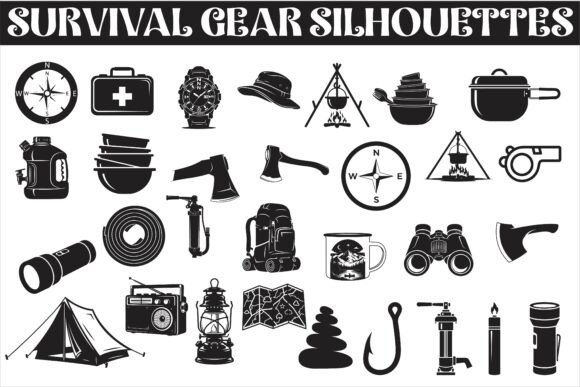
A Rugged Survival Gear Silhouettes: A Practical Vector Collection for Outdoor and Preparedness Design
Visual communication in the outdoor and preparedness space demands clarity, consistency, and immediate recognition. When you need to represent essential survival tools without distracting detail, a well-executed silhouette collection can be far more effective than complex illustrations or photography. A Rugged Survival Gear Silhouettes delivers exactly that: a focused library of black, clean vector outlines covering the core gear that defines camping, hiking, bushcraft, and emergency readiness.
This article evaluates what this collection offers, who it serves best, and how it performs across different design contexts. Whether you are creating branding for an outdoor gear company, building infographics for a survival training course, or producing cut files for a Cricut project, understanding the strengths and limitations of this asset pack will help you decide if it fits your workflow.
What the Collection Contains
The set includes thirty distinct silhouette designs, each representing a piece of essential outdoor or emergency equipment. The lineup covers knives, axes, backpacks, tents, compasses, flashlights, fire starters, rope, canteens, first aid kits, and multi-tools. Every item is rendered as a bold, minimalist vector silhouette with no internal linework or shading, which keeps the visual language consistent across the entire pack.
File delivery is comprehensive. You receive thirty EPS files, thirty JPG files, thirty PNG files with transparent backgrounds, thirty SVG files, thirty PDF files, and thirty AI files in Adobe Illustrator format. This variety means the collection works across nearly any design tool or production method, from professional desktop publishing software to hobbyist cutting machines.
Key Strengths of the Design Approach
The decision to use pure black silhouettes rather than detailed illustrations is the collection's most deliberate and useful characteristic. Silhouettes communicate form and function instantly because the human brain recognizes object shape faster than it processes internal details. For signage, apparel prints, and small-scale applications like logos or icons, this simplicity ensures readability at a distance and at reduced sizes.
The consistent style across all thirty items is another practical advantage. When you use multiple silhouettes together in a single composition—for example, in an infographic about emergency preparedness or on a poster for a wilderness skills workshop—the visual harmony is immediate. There is no mismatch in line weight, rendering technique, or level of detail. This saves time that would otherwise be spent matching or adjusting disparate assets from different sources.
Minimalist vector style also translates well to cutting projects. Because the outlines are clean and lack fine internal cuts or thin gaps, they perform reliably on Cricut and Silhouette machines. The SVG and EPS formats preserve the vector paths exactly, so you can scale them up for a large wall decal or down for a patch design without any loss of quality.
Usability and File Format Considerations
Having seven file formats included in one purchase is genuinely useful, not just a checklist item. Here is how each format serves a specific purpose:
- AI and EPS work directly in Adobe Illustrator for professional vector editing, color changes, and layout integration.
- SVG is ideal for web use, responsive design, and cutting machines that accept scalable vector graphics.
- PNG with transparency allows immediate use in presentation software, basic image editors, or drag-and-drop design tools like Canva without needing to install vector software.
- PDF provides a reliable format for sending proofs to clients or for printing at various sizes.
- JPG works for quick previews or use in applications that do not support transparency.
This breadth of formats reduces friction in real-world workflows. A freelance designer building a brand kit for an adventure gear startup can import the AI files directly. A blogger creating a visual guide to ten essential survival items can drop PNGs into their content management system. A small business owner producing heat-transfer vinyl decals can use SVGs without conversion. The collection accommodates all of these use cases without requiring additional software.
Real-World Application Scenarios
The collection demonstrates its strongest value in projects where clarity and professionalism matter more than artistic flair. Outdoor gear brands building product category icons on their website will find the silhouettes consistent and legible. Survival training instructors creating handouts or slide decks can illustrate each piece of gear with a clean visual that students can identify at a glance.
For infographics, the silhouettes work well because they do not compete with data or text. They function as visual anchors that reinforce the subject matter without overwhelming the layout. A preparedness blogger comparing different types of fire starters, for instance, can use the fire starter silhouette as a repeating visual element that ties the infographic together.
Apparel and merchandise design is another area where these silhouettes fit naturally. A single axe or compass silhouette screen-printed on a t-shirt has a clean, rugged look that appeals to outdoor enthusiasts. The bold black shape reads clearly on light-colored garments, and the vector files make it easy to adjust scale or rotate the image for different placements.
For Cricut and Silhouette cutting projects, the collection reduces preparation time significantly. Because the designs are already simplified to clean outlines, there is less need to simplify or clean up complex artwork before cutting. The SVG files import directly into most cutting software, and the transparent PNG files serve as reliable references for sizing and placement.
Who Benefits Most from This Collection
This asset pack is not designed for every design scenario, but it serves specific audiences well. Graphic designers and marketers working with outdoor, survival, or preparedness clients will find it a time-saving resource for creating consistent visual systems. Freelancers who take on adventure branding or infographic projects can use these silhouettes as a foundation that speeds up production without sacrificing quality.
Small business owners who produce their own marketing materials can also benefit. If you run a camping gear shop, a survival training company, or an outdoor education program, having a ready-to-use set of professional silhouettes means you can create flyers, social media graphics, and signage without hiring a designer for every asset.
Educators teaching wilderness skills, emergency preparedness, or outdoor leadership can incorporate the silhouettes into handouts, presentation slides, and instructional posters. The consistency of the visuals helps learners focus on the equipment itself rather than being distracted by varying illustration styles.
Hobbyists who enjoy creating outdoor-themed crafts, decals, or apparel will find the collection straightforward to work with. The SVG format is particularly valuable for this group, as it avoids the need to convert or trace raster images before cutting.
Quality and Consistency Observations
The silhouettes maintain a uniform visual weight and proportion style across all thirty items. There is no sense that some icons were created separately or with a different approach. This tells me the collection was planned as a cohesive set rather than assembled from disparate sources. For any project that uses multiple icons together, this consistency is more valuable than individual icon quality alone.
The level of detail is appropriate for the silhouette format. Key identifying features of each tool are preserved: the blade shape of a knife, the head of an axe, the frame and opening of a backpack. You can identify each item without needing a label, which is the fundamental requirement for effective iconography. At the same time, the designs avoid excessive complexity that would cause problems at small sizes or during cutting.
One practical point worth noting is that the pure black fill means these silhouettes work best on light or transparent backgrounds. If your project requires white or colored silhouettes, you will need to invert or recolor the vector files, which is straightforward with the AI, EPS, or SVG formats. The JPG and PNG files are provided as black shapes, so recoloring those would require an image editor.
Possible Limitations to Consider
No asset pack is universal, and this collection has limitations worth understanding. If your project demands highly detailed, photorealistic, or stylized illustrations, these silhouettes will not serve that purpose. They are intentionally simplified, and that simplification is a feature, not a flaw, but it does limit their use in contexts where visual complexity or texture is required.
The collection includes thirty items, which covers the most common survival and camping tools. If your project requires more specialized equipment—such as water filters, satellite communicators, climbing hardware, or specialized medical gear—you will need to supplement these silhouettes with additional assets. The collection covers the essentials well but does not attempt to be comprehensive across every niche of outdoor equipment.
Another consideration is that the silhouettes are presented as standalone objects rather than in contextual arrangements. You will need to position, scale, and compose them within your own layouts. For experienced designers this is routine, but beginners may prefer packs that include pre-made compositions or layout suggestions.
Long-Term Value and Practical Recommendations
For designers and content creators who regularly produce outdoor or preparedness materials, this collection offers lasting value. The vector files do not degrade over time, and the SVG format ensures compatibility with evolving web standards. A set of clean silhouettes like this can serve as a consistent visual language across years of projects, rebranding efforts, and different media.
I recommend this collection most strongly to those who need reliable, professional-looking icons for repeated use across multiple projects. If you frequently create infographics, instructional materials, product tags, or apparel designs in the outdoor and survival space, the time saved by not creating or sourcing individual silhouettes will quickly offset the purchase cost.
For those using cutting machines, the SVG files are the clear choice. They import cleanly into most software, and the simple paths mean less trouble with machine calibration or material alignment. Test a few cuts on scrap material first to confirm sizing, but the designs themselves should produce clean results.
If your work involves branding for adventure or preparedness businesses, consider using these silhouettes as the basis for a custom icon set. Because they are vector outlines, you can add your own brand colors, modify proportions, or combine elements to create unique marks that still carry the visual language of the original collection.
Ultimately, the value of any asset pack comes down to whether it saves you time, improves your output, or both. A Rugged Survival Gear Silhouettes accomplishes these goals for a specific set of use cases. It is not a flashy or overpromising product. It is a focused, well-executed tool that does exactly what it sets out to do: provide clean, recognizable silhouettes of essential survival gear in formats that actually work across modern design and production workflows. For the right audience, that utility is well worth considering.