Brand Guidelines PowerPoint Template: Build Consistent Visual Identity Across Every Presentation
When you are building a brand, consistency is not a luxury — it is a necessity. Every slide, every color choice, and every font decision either strengthens or weakens the identity you are trying to establish. The Brand Guidelines PowerPoint Template gives you a structured, ready-to-use framework for documenting and presenting your brand standards without starting from a blank canvas. Whether you are a solo entrepreneur finalizing your visual identity or a marketing lead aligning a team of designers, this template helps you move from abstract ideas to concrete, repeatable guidelines.
What the Brand Guidelines PowerPoint Template Actually Does
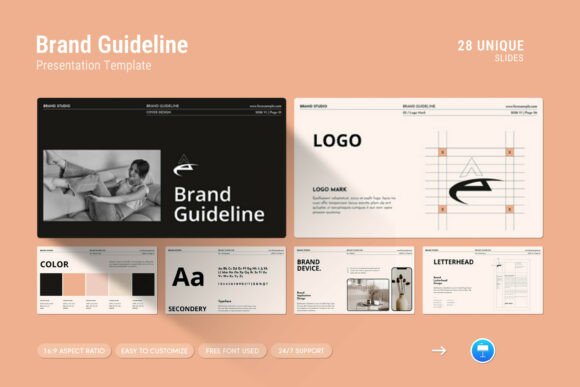
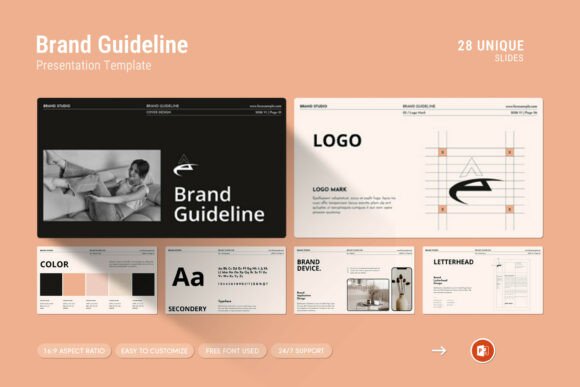
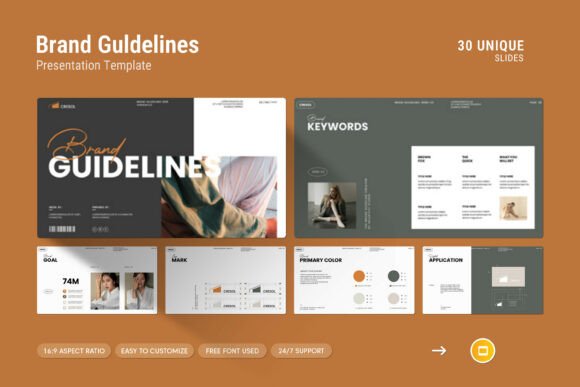
At its core, this template is a presentation file that contains 30 pre-designed slides built around the key elements of brand documentation. It includes layouts for color palettes, typography specifications, logo usage rules, infographics, tables, vector icons, diagrams, and image placement. The design is clean and contemporary — not visually noisy — so the content you add stays front and center.
The template comes in both Google Slides and PPTX formats, works on Apple and Windows, and uses a 16:9 Full HD ratio (1920x1080px). Every element is editable. You can change colors, replace placeholder images with drag-and-drop simplicity, and adjust layouts through master slides. The fonts used are free, and a help file walks you through setup. If you run into issues, the designer provides direct support.
This is not a generic presentation template. It is specifically built for the task of creating a brand guidelines document — a living reference that everyone in your organization or client team can use to maintain visual coherence.
Where the Template Fits in Your Broader Workflow
Brand guidelines are not something you create once and forget. They evolve as your business grows, your product line expands, or your visual preferences mature. The Brand Guidelines PowerPoint Template serves different purposes at different stages of that lifecycle.
Before a Major Brand Refresh or Rebrand
If you are planning to update your visual identity, this template can serve as an audit tool. Use its pre-built sections to document what currently exists — your existing color palette, typography, logo variations, and imagery style. By laying out the current state, you and your team can identify gaps, inconsistencies, or outdated elements before you invest time and money into a redesign. This upfront clarity prevents wasted effort and keeps the rebrand focused on what actually needs to change.
During the Design and Approval Process
Once you have settled on new brand elements, the template becomes a central reference for decision-making. Instead of circulating scattered files — a logo PNG here, a color hex list in an email there — you consolidate everything into one presentation. Designers can see exactly how their work fits into the broader system. Stakeholders can review the full picture during meetings without jumping between documents. The infographics and diagram layouts are particularly useful for explaining rules like minimum clear space around logos or acceptable color combinations. When everyone sees the same information in the same format, approval cycles shorten.
After Launch: Onboarding and Ongoing Consistency
After your brand guidelines are finalized, the template becomes an onboarding resource. New hires, freelance collaborators, or agency partners can receive the presentation as a stand-alone reference. Because it is fully editable, they can zoom in on specific sections, copy elements into their own work, and refer back to it as they produce materials. You can also use the template for internal training sessions — walk through each slide, discuss real examples of correct and incorrect usage, and answer questions in real time. Over time, you can update the file as your brand evolves, keeping everyone aligned without starting over.
Practical Implementation: Getting the Most Out of the Template
A template is only as useful as the system around it. Here are practical ways to integrate the Brand Guidelines PowerPoint Template into your daily work so it becomes a natural part of your process rather than a file that sits untouched on your drive.
Start with the Master Slides
Before you begin adding content, open the master slide view and familiarize yourself with the layout structure. The template uses master slides to keep formatting consistent across all 30 pages. If your brand uses a specific background color, header style, or footer layout, adjust it once in the master instead of editing every slide individually. This upfront investment saves hours of repetitive work later, especially when you need to produce additional slides beyond the original 30.
Use the Vector Icons and Infographics for Clarity
Brand guidelines often contain rules that are easier to show than to explain. The included vector icons and infographic layouts let you visualize concepts like do-not-do examples, hierarchy of logo usage, or color contrast requirements. For instance, instead of writing a paragraph about incorrect logo placement, place a red X over a photo showing the mistake. Pair it with a green checkmark on the correct version. People process visual comparisons faster than text-based rules, and these slides make the guidelines more memorable.
Build a Table of Specifications
One of the most practical features of this template is the table layouts. Use them to create a single reference sheet listing all brand colors with their HEX, RGB, CMYK, and Pantone values. Include a row for each color and a column for its intended use — primary, secondary, accent, background, text. Similarly, create a typography table with font names, weights, sizes, and usage contexts (headings, body copy, captions, buttons). When designers or developers need a quick answer, they can scan the table instead of digging through scattered files.
Plan for Real-World Usage Scenarios
Your brand guidelines should not live in a vacuum. Include slides that show how the brand appears on common touchpoints — business cards, social media graphics, presentation decks, email signatures, website headers, and product packaging. The template's photo layouts allow you to place mockups directly into the presentation. When people see the brand applied in context, they understand the reasoning behind each rule and are more likely to follow it.
Keep the File Editable and Accessible
Because the template is fully editable, you can treat it as a living document. Store the main PPTX file in a shared location like Google Drive, Dropbox, or your team's internal server. Encourage team members to suggest updates or flag outdated information. When you make a change — adding a new color, updating a font license, or revising a logo usage rule — update the master file and notify everyone who uses it. Version control is simple: keep a changelog on the first slide or in a separate notes section. This prevents confusion about which version is current.
How the Template Interacts with Other Tools and Resources
The Brand Guidelines PowerPoint Template does not replace other brand management tools — it complements them. If you use a digital asset management (DAM) system or a platform like Canva, Figma, or Adobe Creative Cloud Libraries, the presentation serves as the narrative companion to those systems. The DAM holds the actual files; the template explains the rules for using them.
For example, after you define your brand colors in the template, you can export the hex values and import them into your design tools as swatches. The typography section of the template can include links to where fonts are hosted or purchased. The logo usage slides can reference the exact file names and formats stored in your DAM. This creates a bridge between the strategic guidelines and the tactical tools your team uses every day.
If you work with external vendors — print shops, web developers, video producers — you can export specific slides from the template as PDFs or images and send them as quick references. They do not need access to your entire tool stack; they just need the rules that apply to their work.
Ensuring Long-Term Usability
A brand guidelines document should not feel outdated after six months. The clean, minimal design of this template helps it age well because it avoids trendy visual elements that quickly feel dated. Stick to your own brand colors and typography, and avoid overloading slides with decorative elements that compete with the content. The template gives you a neutral canvas; your brand provides the personality.
Revisit the document every quarter or after any major brand change. Check whether the examples still reflect your current materials. Update screenshots, swap in new product photos, and refine language as your messaging evolves. If your brand expands into new channels or mediums, add slides that cover those touchpoints. The 30-slide structure gives you room to grow, but you can also duplicate slides or add new ones as needed.
Consistency is not about rigidity — it is about making it easy for anyone to produce on-brand work without guesswork. The Brand Guidelines PowerPoint Template reduces the friction between having a vision and executing it across every presentation, document, and communication your organization shares. When you invest time upfront to populate it thoroughly, you save exponentially more time every time someone needs to create something that represents your brand.
Whether you are preparing for a product launch, training a new team member, or simply bringing order to a chaotic collection of brand assets, this template gives you a practical, repeatable process. The result is not just a slideshow — it is a working tool that keeps your brand recognizable, professional, and coherent across every touchpoint.