Startup PowerPoint Presentation Template: A Practical Tool for Professional Pitches
When you are preparing a pitch deck, a company overview, or a product launch presentation, the visual foundation matters as much as the content. A cluttered or inconsistent slide deck can undermine even the strongest message. The Startup PowerPoint Presentation Template aims to solve this problem by offering a clean, contemporary, and powerful design system. It promises professional photo layouts, infographics, tables, vector icons, diagrams, and a range of built-in features. But does it deliver on its promise in real-world use? Let’s take a practical look at what this template offers, who benefits most from it, and where it fits into your workflow.
What Makes This Template Worth Considering
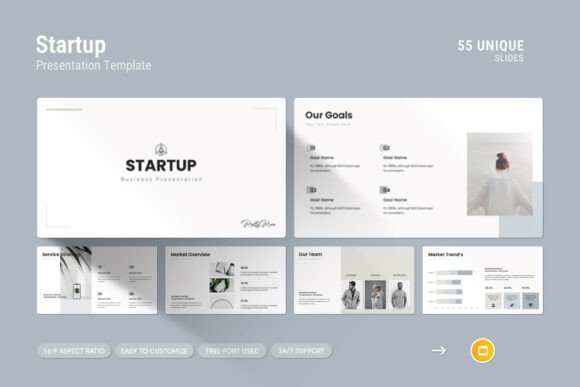
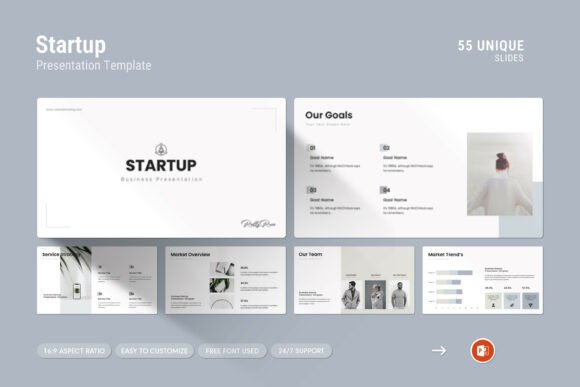
The Startup PowerPoint Presentation Template is more than a set of slides. It is a complete presentation framework designed to help you present your work and company profile at a higher level. The template comes as a .PPTX file, compatible with both Apple and Windows environments, and includes a help file for guidance. With 55 slides in total, it provides enough variety to cover most standard business presentation needs without overwhelming you with unnecessary options.
The design philosophy here is simplicity paired with impact. Instead of relying on flashy animations or overly complex visuals, the template focuses on clean layouts, thoughtful use of space, and consistent typography. This approach works well for audiences who expect professionalism and clarity—investors, clients, partners, and internal teams alike.
Visual Consistency and Professional Layouts
One of the standout characteristics of this template is its visual consistency. Every slide follows a unified design language, which means you can mix and match elements without worrying about clashing styles. The template includes creative photo layouts that allow you to showcase images, team photos, or product shots in a polished way. The drag-and-drop functionality for changing pictures is straightforward and saves time—especially when you are working under a tight deadline.
The inclusion of infographics, tables, vector icons, and diagrams means you can present data and processes clearly without needing to design each element from scratch. For example, you can illustrate market growth with a clean bar chart, outline your business model with a flowchart, or highlight key metrics with an icon-driven layout. These elements are fully editable, so you can adapt colors, sizes, and text to match your brand.
Full HD Ratio and Master Slides
The template uses a 16:9 Full HD ratio (1920x1080px), which is the standard for modern projectors, monitors, and video conferencing platforms. This ensures your presentation looks sharp and fills the screen properly without letterboxing or distortion. The master slides layout allows you to make global changes—like updating a font, color scheme, or logo—across all slides at once. This is a significant time-saver if you need to adapt the deck for different audiences or brand guidelines.
Easy Color Change and Free Fonts
Customization is a key consideration for any template. The Startup PowerPoint Presentation Template makes color changes easy, which is important for aligning the deck with your company’s visual identity. You are not locked into a single palette. The template uses free fonts, so you do not need to purchase additional licenses. This reduces friction when sharing the editable file with collaborators or clients.
Real-World Usability and Workflow Integration
How does this template perform when you actually sit down to build a presentation? In my experience, the biggest advantage is the reduction of decision fatigue. Instead of starting from a blank slide and deciding layout, color, font, and spacing for every element, you have a starting point that already works. You can focus on content and storytelling rather than design details.
The drag-and-drop image replacement works smoothly. You simply right-click or double-click on the placeholder, select your image, and the layout adjusts automatically. This is particularly useful if you are working with a team that includes non-designers—marketers, salespeople, or founders—who need to create professional slides quickly.
The template is also suitable for both live presentations and self-running decks. The clean design translates well to screen sharing, printed handouts, and PDF exports. If you need to send a static version to someone who does not have PowerPoint, the high-resolution output ensures readability and visual appeal remain intact.
Potential Limitations to Consider
No template is perfect for every situation, and this one has a few limitations worth noting. First, while the 55 slides cover a broad range of use cases, the template is geared primarily toward startup and business contexts. If you are creating a highly technical or academic presentation with very specific data visualization needs, you may need to supplement the built-in diagrams with custom charts.
Second, the design style is contemporary but not overly bold. If your brand identity leans toward a very distinct or unconventional visual language, you may find the template’s aesthetic too restrained. However, the easy color change feature helps mitigate this to some extent.
Lastly, the template does not include advanced animation presets or interactive elements. For most professional presentations, this is actually a benefit—overusing animations can distract from your message. But if you rely heavily on dynamic transitions to keep an audience engaged, you will need to add those yourself.
Who Benefits Most from This Template
Based on its features and design approach, the Startup PowerPoint Presentation Template is best suited for:
- Entrepreneurs and startup founders: When pitching to investors or partners, a clean, professional deck can help you make a strong first impression. The template includes slides for business models, team introductions, financials, and timelines.
- Marketers and sales professionals: Whether you are presenting a product launch, a campaign plan, or a quarterly review, the infographics and icon sets help you communicate data and concepts effectively.
- Freelancers and consultants: If you pitch your services to multiple clients, this template gives you a repeatable framework that you can customize per project. The unified design language builds your personal brand consistency.
- Small business owners: Creating a company profile or investor deck is a common need. This template provides a professional starting point without requiring a design background.
- Educators and trainers: For course introductions, workshop materials, or program overviews, the clean layouts and easy image replacement are practical and time-saving.
- Creative professionals and bloggers: If you present portfolio work, case studies, or media kits, the photo layouts and clean typography let your content stand out without competing with the design.
Long-Term Value and Support
A template’s value is not just in its initial use—it is also about how well it holds up over time. The Startup PowerPoint Presentation Template is built on master slides, which makes it relatively future-proof. As your brand evolves, you can update the color scheme, fonts, and logo globally. The vector icons and infographics are resolution-independent, so they remain crisp on high-resolution displays.
The template includes a help file that explains basic usage and customization. However, the real support comes from the designer: the product offers free real support from a skilled designer. If you encounter an issue or have a question about adapting the template, you can contact them directly. This is a meaningful advantage over template packs that leave you to figure everything out on your own.
Final Observations on Practical Fit
In a market crowded with PowerPoint templates, the Startup PowerPoint Presentation Template stands out because it balances simplicity with functionality. It does not try to be everything to everyone. Instead, it focuses on the most common presentation needs for startups and professionals—clean layouts, easy image handling, editable graphics, and a consistent visual identity. For anyone who needs to create a professional business presentation without spending hours on design, this template offers a practical, reliable solution.
If your presentation requires heavy customization, unconventional layouts, or advanced interactivity, this may not be the perfect fit. But for the vast majority of pitch decks, company profiles, and business overviews, it provides a solid foundation that respects your time and elevates your content. The real support from the designer adds a layer of confidence that is rare with digital products. Whether you are a first-time founder preparing your seed round deck or a seasoned consultant refreshing your client pitch, this template can help you present your work in a way that feels intentional, professional, and effective.