Startup Google Slides Template: Practical Ways to Elevate Your Pitch and Company Profile
You have a great idea. Maybe it is a product that solves a nagging problem, a service that fills a gap in your industry, or a platform that connects people in a new way. But if you cannot present that idea clearly and professionally, it might never get the attention it deserves. That is where a solid presentation tool matters. The Startup Google Slides Template is built for moments like these. It is not just another set of slides. It is a practical framework designed to help you communicate your work with clarity and polish.
Think about the last time you sat through a presentation that was cluttered, hard to read, or just plain boring. It probably made you tune out within the first few slides. Now imagine walking into a room—or a Zoom call—with a deck that feels clean, modern, and intentional. That shift in perception can change the conversation. This template gives you that edge without requiring you to be a design expert.
Why presentation design matters more than you think
People often underestimate how much a slide deck influences trust. When you present something that looks crisp and organized, your audience subconsciously associates that polish with your competence. It sounds small, but it works. Whether you are pitching to investors, onboarding a new client, or introducing your team at a conference, the visual backbone of your presentation sets the tone.
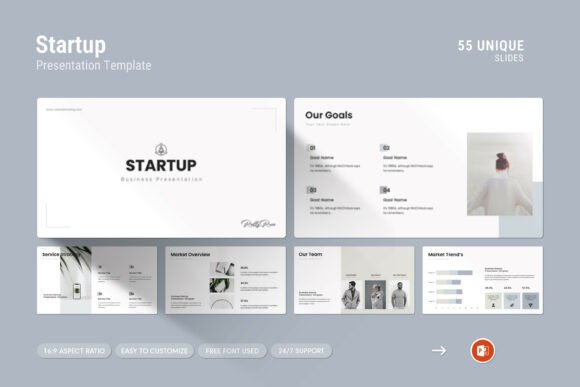
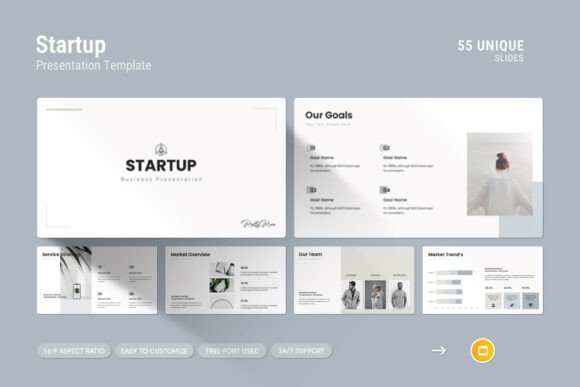
The Startup Google Slides Template leans into this principle. It offers 55 slides in total, each one designed with a clean layout that puts your content front and center. There is no noise. No distracting animations. Just a straightforward, contemporary design that lets your message breathe. That simplicity is powerful because it respects your audience's attention span and guides their focus to what matters most—your story.
Pitching to investors who have seen it all
Investors look at dozens of decks every week. They can spot a generic template from a mile away. What they appreciate is clarity and originality. The Startup Google Slides Template includes creative photo layouts and vector icons that give your pitch a distinct look without being flashy. You can use the infographics to simplify complex data like market size, revenue projections, or user growth. Instead of a boring bar chart, you get a visual that tells the story at a glance.
For example, if you are in the SaaS space, you might use one of the infographic slides to show your monthly recurring revenue trend over the past year. That one slide can replace five minutes of rambling explanation. Investors see the curve, they understand the momentum, and they ask better questions. That is the kind of efficiency that makes a pitch memorable.
Onboarding new team members or partners
Onboarding decks are often an afterthought. Companies throw together a few slides with logos, org charts, and a mission statement, and call it done. But a well-crafted onboarding presentation can set the tone for how a new hire or partner perceives your culture and workflows. With this template, you can build a cohesive onboarding deck that feels intentional. The master slides layout ensures consistency across every page, so your new team member experiences a unified brand voice from day one.
You can also use the tables and diagram slides to outline roles, responsibilities, and reporting structures. That clarity reduces confusion later. When someone joins your startup, they are already navigating a lot of unknowns. A clean, organized onboarding deck removes one layer of uncertainty.
Showcasing your company profile at events
Trade shows, networking events, and industry meetups are prime opportunities to introduce your startup to a wider audience. But you only get a few minutes to make an impression. A company profile slide deck needs to communicate who you are, what you do, and why it matters—fast. The Startup Google Slides Template includes dedicated slides for company history, team bios, and core values. You can pull together a polished profile deck in under an hour because the structure is already there.
For a small business owner running a boutique agency, this is especially valuable. You might not have a full-time designer on staff. But with drag-and-drop picture replacement and easy color changes, you can customize the template to match your brand without touching a single line of code. Swap out the placeholder images with your own team photos or product shots, adjust the color palette to match your logo, and you are ready to present.
Internal strategy sessions and quarterly reviews
Presentations are not just for external audiences. Internal meetings benefit from strong visuals too. Whether you are reviewing quarterly goals, discussing product roadmaps, or brainstorming marketing strategies, a well-structured deck keeps everyone aligned. The template includes diagram slides that work well for mapping out workflows or decision trees. You can also use the vector icons to illustrate concepts like customer journeys or competitive positioning.
One practical observation: teams often waste time formatting slides instead of discussing content. With this template, the formatting is already handled. You drop in your text, adjust the visuals, and focus on the conversation. That time saving adds up. Over the course of a year, you might reclaim hours that would otherwise be spent resizing boxes and aligning text.
Founders and CEOs
If you are the person raising money or leading the company, you need a deck that reflects your vision without distracting from it. The full HD 1920x1080 resolution means your slides look great on any screen, from a laptop to a large conference display. You do not have to worry about pixelation or awkward cropping. The free font used in the template is clean and readable, which matters when you are presenting to a room full of people who may be sitting far from the screen.
Freelancers and consultants
Freelancers often juggle multiple clients with different brands. A template that is easy to customize is a huge advantage. You can create a unique deck for each client without starting from scratch every time. The Startup Google Slides Template works on both Apple and Windows, so you are not locked into a specific operating system. That flexibility is handy when you are collaborating with clients who use different platforms.
For a freelance marketing consultant, for instance, you might use the infographic slides to present campaign performance metrics. The visual approach makes your insights more digestible for clients who are not data experts. Instead of a spreadsheet, they see a clear picture of what is working and what needs adjustment. That builds your credibility and makes you easier to work with.
Educators and workshop facilitators
Teachers and trainers also benefit from a clean presentation framework. If you are running a workshop on entrepreneurship, digital marketing, or design thinking, the template provides a solid foundation. You can use the diagram slides to explain processes step by step. The tables work well for comparing different approaches or summarizing key points. And because the slides are fully editable, you can tweak them to fit the specific needs of each session.
One limitation to keep in mind: if you need highly complex animations or interactive elements, a standard slide deck may not be the best fit. This template focuses on static visuals and clean transitions. That is fine for most presentations, but if you are building an interactive e-learning module, you might want to explore dedicated tools. For face-to-face or live virtual workshops, though, this template is more than sufficient.
What to consider before using this template
While the Startup Google Slides Template is versatile, it is worth thinking about your specific context before diving in. First, consider your audience. If you are presenting to a highly creative group that expects unconventional visuals, the clean and professional style might feel too conservative. In that case, you could customize the color scheme and imagery to inject more personality. The easy color change feature makes that adjustment simple.
Second, think about the length of your presentation. With 55 slides total, you have plenty of room to build a comprehensive deck. But more slides do not always mean a better presentation. Use the slides that serve your narrative and skip the rest. A focused 10-slide pitch is often more effective than a rambling 30-slide one. The master slides layout makes it easy to hide or remove slides you do not need, so you are not stuck with unused content cluttering your file.
Third, consider the file format. The template comes as a .PPTX file, which works seamlessly with Google Slides. If you primarily use PowerPoint, you can still open and edit it, but some formatting may shift slightly. The help file included provides guidance on getting the most out of the template, so it is worth reading through that before you start customizing.
Strengths that stand out
One of the biggest strengths of this template is the real support from a skilled designer. If you run into an issue or need advice on a specific slide, you can reach out and get help. That kind of support is rare for presentation templates and adds a layer of reassurance, especially if you are not particularly design-savvy.
Another strength is the inclusion of vector icons and infographics. These elements are not just decorative—they serve a functional purpose. Icons can replace text in many cases, making your slides more visual and easier to scan. Infographics help you present data in a way that feels natural rather than forced. When used well, these elements turn a good presentation into a great one.
The drag-and-drop picture replacement is another feature that saves time. You do not need to fiddle with image sizes or cropping. Just drop your photo into the placeholder, and the template adjusts. That simplicity encourages you to use more visuals, which generally makes presentations more engaging.
Limitations to keep in mind
No template is perfect for every scenario. The Startup Google Slides Template is designed for professional, business-oriented presentations. If you need a playful or highly artistic style, you might need to push the customization further or look for a different template altogether. The free font included is clean and modern, but if your brand uses a specific typeface, you will need to swap it manually.
Also, while the template works on both Apple and Windows, cloud-based editing in Google Slides is where it feels most natural. If you are working offline or in a restricted environment, that could be a consideration. But for most users, the online experience is smooth and reliable.
Final thoughts on making it your own
The best presentations are the ones that feel authentic to the person or team delivering them. A template is just a starting point. The Startup Google Slides Template gives you a strong foundation, but your content, passion, and expertise are what truly connect with an audience. Use the template to remove the friction of design so you can focus on what you want to say. When you do that, your presentation becomes more than a deck—it becomes a conversation starter, a trust builder, and a tool that helps you move forward.