Rexus Google Slides Template: A Practical Tool for Modern Business Communication
Presentations remain one of the most effective ways to share ideas, pitch products, or align teams. But the days of cluttered slides and inconsistent branding are fading. Audiences now expect clarity, visual coherence, and a narrative that feels intentional. The Rexus Google Slides Template offers a straightforward path to meeting those expectations without requiring advanced design skills. It combines a clean aesthetic with practical features that support professionals across industries.
Why Presentation Design Demands More Attention Today
Over the past few years, the way people consume information has shifted. Attention spans are shorter, remote work has normalized screen-based communication, and decision-makers often review slides on their own before meetings. In this context, a well-structured presentation becomes a competitive advantage. It can convey credibility before a single word is spoken.
Many professionals still rely on default templates that feel generic or outdated. Others spend hours trying to customize layouts, only to end up with inconsistent fonts and misaligned graphics. The Rexus Google Slides Template addresses this gap by offering a cohesive system that works from the first slide to the last. Its design is contemporary but not flashy, powerful but not overwhelming.
Modern workflows also demand flexibility. People switch between devices, operating systems, and collaboration tools. A template that works seamlessly on both Apple and Windows, and within Google Slides itself, removes friction. When you can open a file, adjust it, and share it without worrying about compatibility, you save time and reduce frustration.
What Makes the Rexus Google Slides Template Stand Out
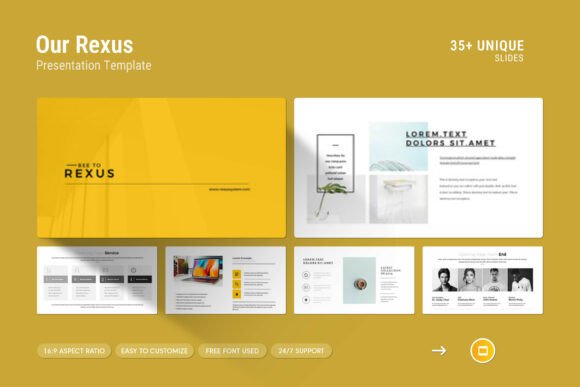
At its core, this template is built around the idea that professionals need both structure and freedom. It includes 39 slides in total, which may sound like a lot, but each one serves a distinct purpose. You get creative photo layouts for visual storytelling, infographics for data presentation, tables for comparisons, vector icons for quick visual cues, and diagrams for processes or hierarchies. The variety means you are unlikely to need external assets for most standard presentations.
One of the more practical features is the drag-and-drop picture functionality. You do not need to fiddle with cropping or resizing. Simply place your image, and the template adjusts. This is especially useful for team members who are not comfortable with design tools. It also reduces the time spent on repetitive formatting tasks, allowing you to focus on content.
Color change is equally straightforward. Whether you need to match brand guidelines or adapt to a specific theme, the template supports easy global adjustments. This consistency across slides ensures that your presentation feels unified, even when multiple people contribute to it.
Master Slides and Full HD Ratio
The inclusion of master slides is a feature that experienced presenters will appreciate. It allows you to make changes once and have them apply across the entire deck. This is particularly valuable for longer presentations or when updates are needed at the last minute. Instead of editing each slide individually, you adjust the master layout, and the rest follows.
The 16:9 Full HD ratio (1920x1080px) aligns with current screen standards. Whether you present on a laptop, a large monitor, or a projector, the slides will fill the screen without black bars or awkward cropping. This might seem like a small detail, but it contributes to a polished, professional appearance.
How the Template Fits into Current Business and Creative Trends
Several trends in communication and workplace culture make a template like Rexus particularly relevant. First, the rise of remote and hybrid work means presentations are often shared asynchronously. A clean, self-explanatory slide deck can communicate your message even when you are not in the room. Second, there is a growing preference for visual storytelling over text-heavy reports. Infographics, diagrams, and icon-based layouts help viewers grasp complex information faster.
Third, non-designers are increasingly expected to produce high-quality visual content. Marketers, educators, freelancers, and entrepreneurs often have to create presentations without dedicated design support. Tools that simplify this process without sacrificing quality become essential. The Rexus Google Slides Template lowers the barrier to entry, enabling anyone to produce slides that look intentional and well-crafted.
Fourth, brand consistency matters more than ever. Whether you are a solopreneur or part of a larger organization, how you present yourself visually affects trust. A template that allows easy color changes and maintains layout coherence helps you reinforce your brand identity across every touchpoint.
Practical Implications for Different Users
For business owners and entrepreneurs, time is a scarce resource. Spending hours formatting slides is rarely the best use of it. With Rexus, you can open the .pptx file, swap in your content, adjust colors to match your brand, and have a pitch-ready deck in a fraction of the time. The vector icons and infographics also help you communicate metrics, timelines, and value propositions more clearly than text alone.
For educators and trainers, the template offers a way to structure lessons or workshops visually. Diagrams can illustrate processes, tables can summarize data, and photo layouts can make case studies more relatable. Students and participants tend to retain information better when it is presented with visual variety, and this template supports that without becoming distracting.
For marketers and content creators, presentations often serve as lead magnets, webinar visuals, or internal strategy documents. Having a consistent format across these outputs builds recognition. The drag-and-drop image feature is particularly handy when you need to update visuals frequently, such as for monthly reports or campaign recaps.
For freelancers and hobbyists, the template provides a professional edge. Whether you are pitching a project, showcasing a portfolio, or sharing research, a polished presentation can set you apart from others who rely on default templates. The free font used in the design also means you do not have to worry about licensing issues or missing typefaces when opening the file on different systems.
Realistic Recommendations for Getting the Most Out of It
Start by reviewing all 39 slides to understand the range of layouts available. You might not use every slide in one deck, but knowing what is there helps you choose the right format for each section. For example, if you have a lot of numerical data, look for the infographic and table slides first. If you are telling a story with images, the photo layouts will serve you better.
Take advantage of the master slides for global changes. Before you start editing individual slides, set your brand colors and fonts on the master. This ensures that every new slide you add follows the same style. It also makes last-minute adjustments much less painful.
Use the vector icons and diagrams to replace bullet points where possible. Instead of listing three steps, try a horizontal diagram that shows progression. Instead of a bullet list of features, use icons next to short descriptions. These small changes make slides more scannable and memorable.
Keep in mind that the template is fully editable. If a specific layout does not quite fit your content, you can modify it. Move elements, resize boxes, or adjust spacing. The structure is there to guide you, not to restrict you. The support team also offers real assistance if you encounter any issues, which adds a layer of reassurance that is not always available with digital products.
Observations on the Evolution of Presentation Tools
Presentation software has come a long way from the early days of rigid templates and limited design options. Today, users expect flexibility, ease of use, and professional results from the start. The Rexus Google Slides Template reflects this shift by focusing on practical utility rather than decorative flair. It does not try to impress with unnecessary animations or complex transitions. Instead, it provides a solid foundation for clear communication.
Another notable change is the move toward collaborative workflows. Google Slides itself is built for real-time collaboration, and this template fits naturally into that environment. Teams can work on the same deck simultaneously, leave comments, and iterate quickly. The template's consistency helps maintain order even when multiple people are editing.
The availability of free fonts in the design is also worth mentioning. Licensing concerns can be a real headache when sharing files across teams or with clients. Using fonts that are free to use and widely available removes that worry. You can share the .pptx file without having to embed fonts or send additional files.
Final Thoughts on Choosing a Presentation Template
Selecting a template is about more than just aesthetics. It is about finding a tool that fits your workflow, your audience, and your content. The Rexus Google Slides Template offers a balanced combination of clean design, useful features, and practical flexibility. Whether you are preparing a boardroom pitch, a classroom lecture, or a community presentation, it gives you a structure that supports your message rather than competing with it.
In a world where visual communication continues to grow in importance, having a reliable presentation template is a small investment with a meaningful return. It saves time, reduces stress, and helps you show your work in a way that feels professional and intentional. If you are looking for a template that works across devices, offers a variety of layouts, and is easy to customize, this one deserves a close look.