Evaluating the Business Space PowerPoint Template for Professional Presentations
Creating a presentation that communicates complex ideas clearly while maintaining a polished, professional appearance is a common challenge. The Business Space PowerPoint Template positions itself as a solution that blends simplicity with modern design capabilities. For anyone evaluating presentation tools, understanding what this template offers, where it excels, and where it may fall short is essential to making an informed choice.
What the Business Space PowerPoint Template Offers
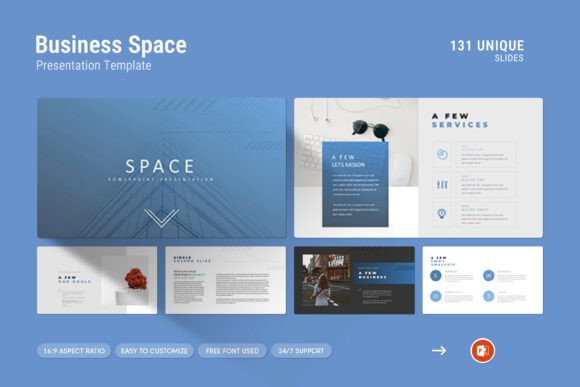
The Business Space PowerPoint Template is a presentation framework designed to help users produce clean, contemporary slide decks. It includes 131 slides in total, leveraging master slide layouts for consistency across presentations. The template works on both Apple and Windows platforms, and it is built for the 16:9 Full HD ratio (1920x1080 pixels), which is the standard for modern displays and projectors.
Key components of the template include creative photo layouts, infographics, tables, vector icons, and diagrams. These elements are intended to support users who need to present company profiles, project updates, business plans, or data-driven reports. The template is delivered as a PowerPoint .PPTX file and includes a help file to guide setup and customization.
One notable feature is the drag-and-drop functionality for changing images, which simplifies the process of updating visuals without needing advanced design skills. The color scheme is also customizable, and the template uses free fonts, reducing the need for additional purchases.
Why This Template Attracts Attention
Professionals often look for templates that strike a balance between structure and flexibility. A rigid template can stifle creativity, while one that is too open-ended may lead to inconsistent results. The Business Space PowerPoint Template attempts to address this by offering pre-built layouts that still allow for customization.
Another draw is the inclusion of infographics and diagrams. Data visualization is increasingly important in business communication, and having ready-made elements can save time. For someone who frequently presents quarterly results, strategic plans, or product roadmaps, these features can be particularly appealing.
The cross-platform compatibility is also a practical advantage. Many organizations use a mix of Windows and macOS devices, and a template that works seamlessly on both reduces workflow friction.
Benefits of Using This Template
One of the primary benefits is the time savings it offers. Starting from a blank slide deck can be daunting and time-consuming. With 131 slides already structured, users can focus on content rather than layout. The master slide layouts ensure that fonts, colors, and positioning remain consistent throughout the presentation, which is critical for maintaining a professional image.
The drag-and-drop image replacement is another practical benefit. Instead of manually resizing and positioning images, users can simply insert new visuals, and the template adjusts automatically. This is especially useful for teams where multiple people may be contributing slides.
The inclusion of vector icons and infographics allows for visual storytelling without requiring specialized graphic design skills. Icons can replace text-heavy bullet points, making slides more engaging and easier to digest. Infographics help present data in a way that highlights key insights rather than overwhelming the audience with raw numbers.
Color customization is another advantage. Many companies have specific brand guidelines, and the ability to adjust the color palette easily ensures that the template can be adapted to match corporate identity.
Tradeoffs and Considerations
While the template offers many features, there are tradeoffs to consider. One is the learning curve associated with master slides. Although the template is designed to be easy to use, users who are unfamiliar with PowerPoint's master slide functionality may find initial customization confusing. The included help file mitigates this, but it still requires some investment in learning.
Another consideration is the template's design style. The description emphasizes a "simple, contemporary but powerful" design. For some audiences, this may feel too generic or overused. If your presentation needs to stand out in a highly competitive context, a more unique or custom-designed template might be a better fit.
The reliance on free fonts is generally a positive, but it also means that the final look depends on the fonts being installed correctly on the presentation device. If a font is missing, PowerPoint may substitute it with another, potentially altering the intended design.
File size and performance are also factors. With 131 slides and multiple embedded elements, the template may result in larger file sizes. This can be a concern if you need to share the file via email or store it on a platform with size limits.
Expectations for Users
Users should expect that the template provides a solid foundation, not a finished product. Even with drag-and-drop functionality and pre-built layouts, some manual effort is required to tailor the template to specific content. Text needs to be entered, images need to be selected, and data needs to be populated into tables and charts.
The template is best suited for users who have a clear idea of their content but need help with structure and visual consistency. It is less suitable for those who want a fully automated solution that generates slides from raw data.
Technical support is available from the designer, which is a valuable resource. However, response times may vary, and users should not rely on immediate assistance during time-sensitive projects.
Strong Fit Situations
The Business Space PowerPoint Template is a strong fit for the following scenarios:
- Company profile presentations: The template's clean layout and photo integration work well for showcasing team members, office spaces, or product images.
- Data-heavy reports: With infographics, tables, and diagrams, the template helps present complex information in an accessible format.
- Standard business updates: Quarterly reviews, project status reports, and strategy overviews benefit from the template's consistent structure.
- Teams with multiple contributors: Master slides ensure that everyone follows the same design guidelines, reducing the need for last-minute formatting corrections.
- Users with limited design experience: The drag-and-drop features and pre-built layouts lower the barrier to creating polished presentations.
When Alternatives May Be Worth Considering
There are situations where this template may not be the best choice. If your presentation requires highly unconventional layouts, animations, or interactivity, a more flexible design tool or a custom-built solution may serve you better.
For users who need presentations that are heavily brand-specific with unique typography, color gradients, and custom graphics, the template's customization options may feel limiting. In such cases, working with a professional designer or using a more modular template platform could be preferable.
If your workflow relies on cloud-based presentation software like Google Slides or Keynote, the PowerPoint-centric nature of this template may cause compatibility issues. While PowerPoint files can be imported into other tools, formatting often shifts during conversion.
For presentations aimed at highly creative or design-savvy audiences, the template's "contemporary" style may appear too conventional. A more avant-garde or minimalistic approach might be needed to capture attention.
Practical Decision-Making Insights
When evaluating this template, consider the following questions:
- What is the primary goal of your presentation? If clarity and consistency are top priorities, this template is a strong candidate. If the goal is to surprise or impress with novel design, you may need additional customization.
- Who is your audience? For internal teams, clients, or investors who value substance over flash, the template's clean design works well. For external events where visual impact is crucial, assess whether the template's style aligns with your message.
- What is your skill level with PowerPoint? Users comfortable with master slides and basic customization will get the most out of this template. Beginners should budget time for learning.
- How much time do you have? The template saves time compared to building from scratch, but it is not instant. Factor in time for content creation, image selection, and fine-tuning.
- What is your budget? The template comes with a help file and support, which adds value. Compare the cost against the time you would spend designing your own slides or hiring a designer.
Aligning the Template with Your Goals
Ultimately, whether the Business Space PowerPoint Template aligns with your needs depends on your specific context. If you value efficiency, consistency, and a modern aesthetic without requiring extensive design skills, this template offers a practical solution. It is well-suited for standard business communications where the focus should be on content rather than visual experimentation.
If your presentation demands a high degree of originality, advanced interactivity, or strict adherence to a unique brand identity, consider using the template as a starting point and then customizing it further, or explore alternatives that offer more creative freedom.
The decision also depends on your team's workflow. For collaborative projects where multiple people contribute slides, the template's structured approach reduces friction. For solo users who prefer complete creative control, a blank canvas paired with design principles may be more satisfying.
Final Thoughts on the Business Space PowerPoint Template
The Business Space PowerPoint Template provides a comprehensive set of tools for building professional presentations efficiently. Its strengths lie in its structured layouts, built-in visual elements, and cross-platform compatibility. The tradeoffs include a moderate learning curve for master slides and a design style that may feel generic to some audiences.
For professionals seeking a reliable framework that reduces the effort of creating consistent, clean presentations, this template is a worthwhile consideration. By understanding its capabilities and limitations, you can make an informed decision that aligns with your presentation goals and audience expectations.