Evaluating the Brand Guidelines Keynote Template for Professional Presentations
When you need to communicate a company’s visual identity clearly and consistently, a structured presentation can make the process far more efficient. The Brand Guidelines Keynote Template is a pre-built presentation file designed to help teams, designers, and marketers showcase brand rules, logo usage, typography, color palettes, and other identity elements. Rather than starting from a blank canvas, this template offers a foundation that can be adapted to your specific needs. Understanding what this template includes, where it excels, and where it may fall short will help you determine whether it aligns with your workflow and goals.
What the Brand Guidelines Keynote Template Offers
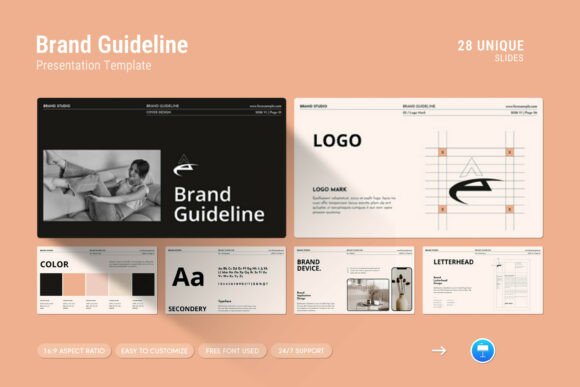
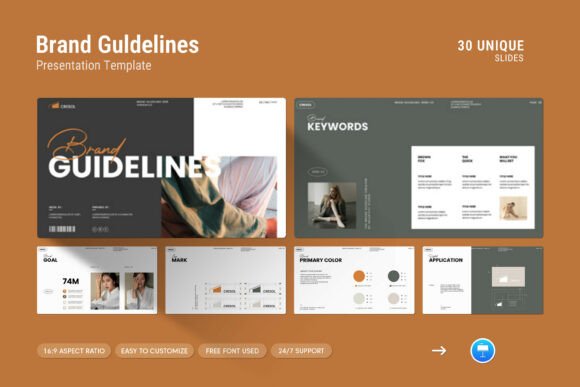
This template is packaged as a Keynote .KEY file accompanied by a help file. It contains 30 slides in a 16:9 Full HD format (1920x1080px), which is the standard aspect ratio for most modern screens and projectors. The design is described as simple, contemporary, and clean, incorporating creative photo layouts, infographics, tables, vector icons, and diagrams. These elements are intended to allow you to present your brand guidelines and company profile in a polished manner without needing extensive design skills.
Key features include master slide layouts, drag-and-drop image replacement, easy color changes, and full editability. The template works on both Apple and Windows versions of Keynote, and it uses free fonts, so you won’t need additional purchases to get started. The help file provides guidance on using the template, and the seller offers free real support from a designer if you encounter issues.
Why You Might Consider This Template
There are several practical reasons someone might be interested in a brand guidelines keynote template. First, creating a comprehensive brand guidelines document from scratch requires significant time and design effort. A template reduces that overhead by providing a structure and visual language you can populate with your content. Second, if you present to clients, stakeholders, or internal teams regularly, having a consistent, professional-looking deck helps reinforce your brand’s credibility. Third, the inclusion of infographics, tables, and diagrams means you can illustrate complex brand rules—such as spacing requirements, color values, or typography hierarchies—in a visually clear way.
For marketing teams, design agencies, or startups that are formalizing their brand identity, this template offers a shortcut to a coherent presentation without needing to hire a designer for the slide layout itself. The drag-and-drop image feature and easy color change also mean you can adapt the template to match your existing brand palette quickly.
Benefits and Practical Advantages
One of the strongest benefits is the time savings. The 30-slide structure covers a range of typical sections, from introductory slides to detailed guidelines, saving you from deciding how to organize information. The master slide layout ensures consistency across all slides, which is especially important when presenting brand rules—inconsistency in the presentation itself would undermine the message.
Another advantage is the flexibility of editing. Because the template is fully editable, you can rearrange slides, delete those you don’t need, add custom sections, and adjust colors and fonts to match your brand. The drag-and-drop picture feature lowers the technical barrier: you don’t need to work with masking or complex image placement tools. For users familiar with Keynote, this template will feel intuitive to customize.
The free fonts requirement is also a practical consideration. Some templates require paid fonts, which can complicate team adoption or increase costs. Here, the free fonts policy means you can share the file with colleagues without worrying about licensing issues. The support option is another plus: if you get stuck, a designer is available to help, which can be valuable for less experienced users.
Tradeoffs and Limitations to Consider
No template is perfect for every situation, and there are tradeoffs to weigh. The template is specifically designed for Keynote, not PowerPoint or Google Slides. If your organization primarily uses PowerPoint, you may need to convert the file, which can sometimes cause formatting shifts or loss of certain features. While Keynote is available on both Apple and Windows, it is less common in many corporate environments that rely on Microsoft Office. This could be a significant limitation if you need to collaborate with stakeholders who do not have Keynote.
Another consideration is the level of customization. While the template is editable, the design language is predetermined. If your brand has a very specific visual style that differs from the contemporary, minimalist look of the template, you may find yourself making extensive overrides. In some cases, starting from a simpler, more neutral template or a blank file might allow for greater creative control. The template’s design choices—such as photo layouts and icon styles—may not suit every industry or brand personality. For example, a law firm or financial institution might prefer a more conservative layout, while a creative agency may find the design too restrained.
The 30-slide count is a starting point, not a constraint. You may need fewer or more slides depending on the depth of your brand guidelines. If you need a very detailed document (covering multiple brand extensions, sub-brands, or platform-specific rules), you may have to supplement the template significantly. Conversely, if you only need a brief overview, 30 slides might feel excessive.
Key Considerations Before Purchasing
Before deciding, think about your primary use case. If you are creating a one-time brand guidelines deck for an internal team or a client presentation, this template can serve you well. If you need a system for producing multiple brand guideline documents across different brands or sub-brands, you might benefit more from a modular template or a consistent design system that you can reuse and adapt.
Also assess your team’s software environment. If everyone uses Keynote, the template integrates seamlessly. If you need to share slides with people who only have PowerPoint or Google Slides, consider how the file will be exported. Keynote can export to PowerPoint, but advanced features like master slides or certain transitions may not transfer perfectly. Test the workflow with a sample slide before committing.
Consider your own design comfort level. The template simplifies the process, but you will still need to populate it with your content, images, and brand assets. If you have a very clear vision of your brand guidelines, the template’s structure may help you organize your thoughts. If you are still developing your brand rules, you might find the template constraining. In that case, a more flexible approach—such as using a simple slide deck and building sections as you go—could be more practical.
Another practical factor is the support provided. Free support from a designer can be a safety net, but it may not cover extensive customization requests. The support is for help with the template itself, not for designing your brand guidelines. Manage your expectations accordingly.
When This Template Is a Strong Fit
The Brand Guidelines Keynote Template is a strong fit in several scenarios. For small to medium-sized businesses that are establishing their brand identity for the first time, this template offers a structured way to document and communicate rules. It is also well-suited for design agencies that need to present brand guidelines to clients frequently and want a consistent, professional format that can be quickly adapted per project.
Marketing teams that need to align internal stakeholders around a new or updated brand will find the 30-slide structure enough to cover the main pillars of brand identity. Non-designers who are tasked with creating a brand presentation will benefit from the drag-and-drop and easy color change features, reducing the learning curve. The template is also a good choice for educators or trainers who teach brand management and need a visual teaching aid.
If you are evaluating several template options, the inclusion of infographics, vector icons, and diagrams sets this one apart for visual communication. If your brand relies heavily on data visualization or process diagrams, these built-in elements can save time and improve clarity.
When Alternatives May Be Worth Considering
Alternatives may be more appropriate if your organization is deeply integrated with PowerPoint or Google Slides. Many PowerPoint-specific templates offer similar features, and the native file format avoids conversion issues. If you need a more comprehensive brand management tool rather than a presentation template, you might consider dedicated brand guideline software or platforms that allow you to create interactive, web-based guidelines.
If your brand guidelines are extensive and include detailed rules for digital interfaces, social media, motion graphics, or environmental design, a static presentation template may not capture everything effectively. In those cases, a combination of a presentation for high-level overviews and a detailed online guide might serve better. Similarly, if you need to include interactive elements like clickable navigation or embedded video, Keynote can handle some of that, but a dedicated digital solution might offer more flexibility.
For users who prioritize minimal cost, free Keynote templates are available online, though they may lack the polish and support of a paid template. The decision often comes down to how much time you want to invest in customizing a free option versus paying for a more turnkey solution with support.
Practical Decision-Making Insights
To decide whether this template aligns with your needs, start by listing the core sections you need in your brand guidelines. Compare that list to the template’s likely structure (you can usually see a preview on the product page). If the template covers the majority of your sections, it is a viable candidate. If you find yourself needing to add many custom slide types, evaluate how easy it is to duplicate and modify existing slides.
Download the free trial or preview if available, even if it's just a few slides. Testing the template with your content and images will reveal any friction points. Check color change functionality with your brand colors. Try the drag-and-drop feature with an image of your choice. If these basic operations feel smooth, the template will likely serve you well.
Consider also the longevity of the template. If you plan to use it for multiple presentations over time, the style should not feel dated after a few uses. The simple, contemporary design has a neutral quality that tends to age better than highly stylized templates. However, you may want to customize color schemes and photo styles to keep the deck fresh for repeated use.
Finally, factor in the support. If you or your team are not deeply experienced with Keynote, having access to a designer for questions can reduce frustration. If you are a power user, the support may be less critical, but it is still a safety net for unexpected issues.
Conclusion
The Brand Guidelines Keynote Template is a practical tool for anyone who needs to present brand identity in a clear, organized, and visually appealing way. It saves time, reduces design effort, and provides a professional structure out of the box. Its strengths lie in its simplicity, editability, and the variety of built-in visual elements. At the same time, it has limitations regarding software compatibility and design flexibility that you should weigh carefully. By evaluating your specific context—your software environment, team skills, brand complexity, and presentation goals—you can decide whether this template supports your needs effectively or whether an alternative approach would be a better investment.