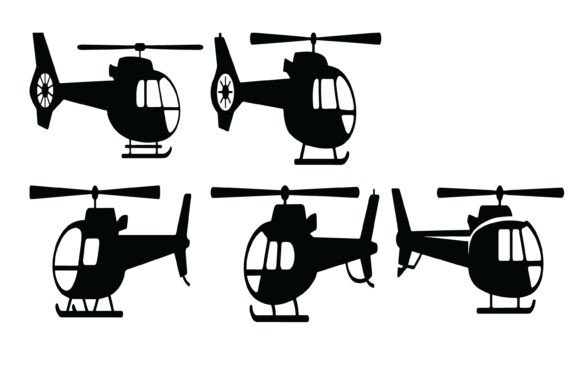
Helicopter Vector Silhouette Set for Creative Projects
Whether you are designing a logo for an aviation startup, creating rescue-themed merchandise, or putting together educational materials about aircraft, having the right visual assets can make all the difference. The Helicopter Vector Silhouette Set offers a collection of clean, bold helicopter illustrations in multiple angles, designed to fit a wide range of creative and professional needs. This set provides scalable vector files and high-resolution PNGs, making it easy to use in both print and digital environments.
In this article, we will walk through what this silhouette set includes, why it is useful for different types of creators, how you can apply it in real projects, and what to keep in mind before using it. Whether you are new to design work or a seasoned professional, you will find practical ideas and honest insights here.
What Makes a Helicopter Silhouette Set Useful
A silhouette removes unnecessary detail and focuses on the essential shape of an object. In the case of helicopters, that means you get the distinctive rotor, tail, fuselage, and landing gear outlined in a solid, recognizable form. The Helicopter Vector Silhouette Set takes this approach and presents multiple perspectives of the same aircraft, so you can choose the angle that best fits your project.
Because the files are provided in vector format (EPS and SVG), you can resize them from a small icon to a large poster without losing any sharpness. The PNG versions come with a transparent background at 5000 × 5000 pixels and 300 DPI, which means they are ready for high-quality printing right out of the box. The set is suitable for both personal and commercial use, so you can use it for client work, products, or your own creative projects.
Who Benefits from This Kind of Asset
You might wonder whether a helicopter silhouette set is only for graphic designers or military enthusiasts. The reality is that many different people find value in such a resource:
- Freelance designers who need quick, clean vectors for client logos, branding, or website graphics.
- Small business owners in aviation, transport, or rescue services looking for affordable, professional imagery.
- Educators and trainers creating infographics, handouts, or presentations about aircraft technology or emergency response.
- Hobbyists and makers who use cutting machines like Cricut or Silhouette for stickers, decals, and apparel.
- Bloggers and content creators covering aviation topics who want consistent visuals for articles or social media.
- Marketers producing posters, brochures, or digital ads for air shows, training centers, or aerospace companies.
If any of these descriptions sound familiar, then this set could save you time and effort while giving your work a polished, professional look.
Practical Ways to Use the Helicopter Vector Silhouette Set
The real value of any design resource lies in how easily you can apply it. Here are several realistic scenarios where the Helicopter Vector Silhouette Set shines.
Logos and Branding
A well-chosen silhouette can become a memorable brand mark. A helicopter operator, a flight school, or an emergency medical service might use a side-view or front-view silhouette in their logo. Because you have multiple angles in the set, you can experiment with different compositions until you find the one that communicates the right feel—whether that is speed, reliability, or rescue readiness.
T-Shirts, Apparel, and Merchandise
For anyone selling printed clothing or accessories, vector silhouettes make excellent designs. You can scale the helicopter to fit a pocket print, a large back graphic, or a sleeve detail. The SVG format works directly with cutting machines, so you can also produce heat-transfer vinyl designs for custom apparel.
Stickers, Decals, and Labels
Stickers remain a popular product for small shops and creators. A helicopter silhouette in transparent PNG format allows you to place the aircraft on any background—a laptop, car window, helmet, or water bottle—without white boxes. The high resolution means even small sticker sizes remain crisp.
Posters and Digital Artwork
If you are creating promotional posters for an air show, a training event, or a museum display, the silhouettes can serve as main visual elements or supporting icons. You can layer them with typography, add color overlays, or combine multiple angles in a single composition. The EPS files give you full editability in vector editors, so adjusting line weight or orientation is straightforward.
Infographics and Educational Projects
Teachers, trainers, and content creators often need clear, simple visuals to explain complex topics. A helicopter silhouette set helps you illustrate parts of an aircraft, show different flight positions, or compare vehicle types without distracting details. The clean contours make it easier for viewers to focus on the information you are presenting.
CNC, Laser, and Vinyl Cutting
Beyond digital use, these silhouettes are suitable for physical fabrication. If you work with laser cutters, CNC routers, or vinyl cutters, the SVG files provide a clean path for cutting wood, acrylic, metal, or adhesive vinyl. The smooth curves and sharp details reduce the need for cleanup after cutting.
What to Look For in a Silhouette Set
Not all vector collections are created equal. Here are a few things to consider when evaluating the Helicopter Vector Silhouette Set or any similar resource.
- Angle variety: Having multiple views (side, front, top, angled) gives you flexibility. One set may cover most of your layout needs.
- File formats: EPS and SVG ensure you can edit the vectors in software like Adobe Illustrator, CorelDRAW, Inkscape, or Affinity Designer. PNG with transparency is handy for quick use in presentations or web graphics.
- Resolution and scale: Check that the PNG files are large enough for your intended print size. At 5000 × 5000 pixels and 300 DPI, this set supports prints up to roughly 16 × 16 inches at full quality.
- Commercial use rights: Confirm whether you can use the files in products you sell. This set includes commercial and personal use, which covers most freelance and business applications.
- Vector quality: Look for smooth curves and well-defined edges. The described set emphasizes sharp details and clean paths, which reduces manual editing time.
Common Mistakes to Avoid
Even with a good set, a few pitfalls can diminish your results. Here are some to keep in mind:
- Overcomplicating the design: Silhouettes work best when kept simple. Resist adding too many effects or extra elements that clash with the clean shape.
- Ignoring contrast: A dark silhouette on a dark background loses impact. Ensure sufficient contrast between the helicopter and the background color or texture.
- Using the wrong angle for the context: A top-view silhouette may not work well for a poster that needs a side profile. Having multiple angles helps, but choose the one that communicates the message clearly.
- Skipping a test print: Always test a small version before producing a large batch of merchandise or a big poster. Check that the silhouette prints crisply at the intended size.
Getting Started with the Helicopter Vector Silhouette Set
If you are new to working with vector files, the process is simpler than you might expect. Download the files, unzip them, and open the EPS or SVG in your preferred design software. From there, you can change the color, scale the image, rotate it, or combine it with other graphics. The transparent PNGs can be imported directly into tools like Canva, PowerPoint, or Photoshop without any preparation.
For cutting machine users, import the SVG into Cricut Design Space or Silhouette Studio. The vector paths will be recognized as cut lines, so you can adjust size and material settings before sending the design to your machine. The clean silhouette style works especially well for single-color cuts in vinyl or heat transfer material.
Where Silhouettes Fit in a Larger Workflow
Design resources like this set are not meant to replace original artwork or photography. Instead, they serve as building blocks that save you time and provide consistent quality. You might use a helicopter silhouette as a base element, then add custom typography, texture, or color gradients to make the design your own. The fact that the files are fully editable means you can adapt them to match your brand or project style without starting from scratch.
For educators and trainers, having a ready-to-use silhouette means you can spend less time drawing and more time building lesson content. For small business owners, it reduces the cost of commissioning custom illustrations while still delivering a professional result.
Final Thoughts on Using This Set
The Helicopter Vector Silhouette Set offers a practical, well-rounded collection of helicopter outlines that can support a wide variety of projects. Whether you are designing a logo, making stickers, developing an infographic, or cutting vinyl decals, the multiple angles and high-quality vector files give you room to experiment and produce polished work. The included PNG files with transparent backgrounds and high resolution make it easy to get started right away, even if you are not a vector expert.
Take a moment to think about your current or upcoming projects. Do any of them involve aviation, rescue, transport, or technology themes? If so, having a reliable set of helicopter silhouettes in your toolkit could be a helpful addition. With the right files in hand, you can focus more on the creative part of your work and less on the technical setup.