The Minimal Idea Keynote Template: Design, Clarity, and Efficiency in Every Slide
Creating a presentation that captures and holds attention is no small task. The slides need to communicate complex ideas quickly, look professional, and leave a lasting impression without feeling cluttered or confusing. This is precisely where the Minimal Idea Keynote Template comes into play. It offers a clean, contemporary aesthetic that strips away unnecessary distractions and focuses on what truly matters: your content. Whether you are pitching a new product, presenting quarterly results, or building a company profile that reflects your brand identity, this template provides a powerful framework that feels both modern and timeless.
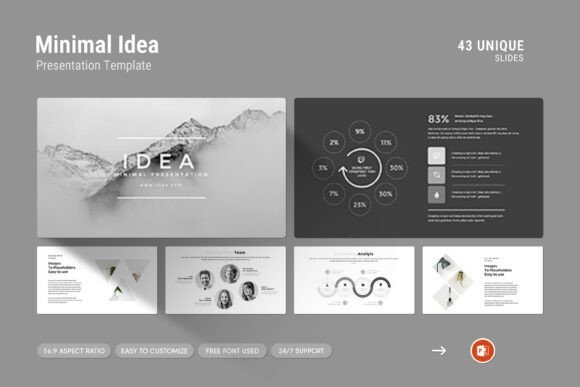
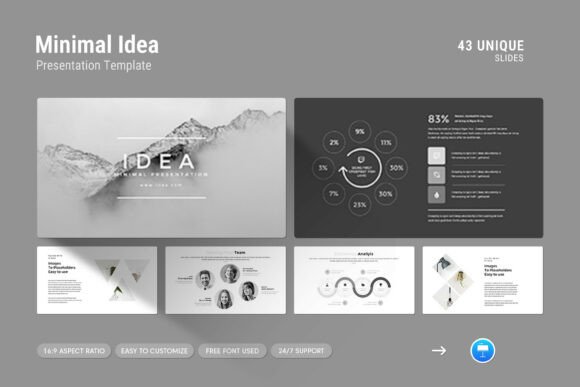
What sets this keynote template apart is not just its visual appeal, but the thoughtfulness embedded in its design. With over 40 slides, master layout options, and a range of built-in features like infographics, vector icons, and creative photo layouts, it gives you the tools to tell your story in a compelling way. The emphasis on simplicity does not mean sacrificing depth or variety. Instead, it empowers you to present data, narratives, and visuals in a structured manner that is easy for your audience to follow. Let's take a closer look at why this template works so well for modern professionals and how you can get the most out of its features.
Understanding the Core Philosophy Behind the Minimal Idea Keynote Template
The name itself gives a strong clue about the design philosophy. "Minimal Idea" is not about having fewer slides or less information. It is about presenting ideas in their purest form, without decorative overload that often distracts from the message. Every element in this template, from the typography to the spacing, serves a purpose. The use of clean lines, generous white space, and subtle color accents creates a sense of harmony that makes your content feel more authoritative and polished.
One of the main challenges presenters face is the temptation to include too much text or too many visuals on a single slide. The Minimal Idea Keynote Template gently guides you toward better habits. Its layout structures encourage brevity and focus. For example, the creative photo layouts are designed to complement your message rather than overwhelm it. When you drag and drop an image into a dedicated placeholder, it automatically fits into the composition, maintaining the visual balance of the slide. This kind of intuitive design helps you work faster and with more confidence, especially when you are under tight deadlines.
Key Features That Elevate Your Presentation Workflow
When you start working with this template, you will quickly notice how its features are built to save time and reduce friction. Drag and drop functionality is a standout. Instead of wrestling with alignment or resizing, you simply insert your images and the template does the heavy lifting. This might seem like a small convenience, but when you are dealing with a deck of 30 or 40 slides, those minutes add up. The same applies to the easy color change feature. With a few clicks, you can adjust the entire palette to match your brand guidelines, client preferences, or even the mood of your presentation. This flexibility is invaluable for agency professionals, freelancers, and corporate teams who need to produce on-brand presentations regularly.
The inclusion of master slides is another significant advantage. Master slides serve as the foundation for your presentation, allowing you to apply consistent headers, footers, and background elements across all slides with a single update. If you have ever had to manually adjust the font size or logo placement on every slide, you know how tedious that can be. With master slides, you maintain consistency effortlessly. The template also provides a full HD 16:9 ratio at 1920x1080 pixels, ensuring your slides look crisp on modern screens and projectors. No more worrying about distorted images or awkward cropping during your presentation.
Let's talk about the infographics, tables, and diagrams. Data is a crucial part of many presentations, but raw numbers can be dry and hard to digest. The Minimal Idea Keynote Template includes a variety of pre-designed infographic elements that turn statistics into visual stories. You can illustrate growth trends, compare metrics, or show process flows without needing to design from scratch. The vector icons add another layer of visual communication. Instead of writing a bullet point like "Customer Satisfaction," you can pair it with a relevant icon, making the slide more engaging and memorable. These small touches elevate the overall quality of your presentation and show your audience that you have put thought into every detail.
Practical Applications Across Industries and Scenarios
One of the strengths of this keynote template is its versatility. It is not locked into a single use case. For startups, it provides a framework for investor pitch decks. The clean design helps investors focus on your traction, business model, and market opportunity without visual noise. For corporate teams, it works beautifully for internal reports, strategy overviews, and training materials. The professional look reinforces credibility, which is especially important when presenting to executives or stakeholders who expect a high standard of communication.
Creative professionals such as designers, photographers, and architects will also find the template appealing. The photo-centric layouts allow you to showcase your portfolio or project visuals in a way that feels curated and intentional. You are not just putting images on a slide; you are presenting them in a designed context that adds value. Similarly, educators and consultants can use the template for workshops, course materials, or client proposals. The infographics and diagrams help explain concepts that might otherwise require lengthy explanations. By visualising your ideas, you make them more accessible and easier to retain.
Consider a scenario where you need to present a company profile to a potential client. You want to highlight your mission, team, services, and case studies. With the Minimal Idea Keynote Template, you can structure this narrative across several slides, each with a distinct purpose. The first slide introduces your brand with a strong visual and tagline. The next few slides use clean text layouts and vector icons to detail your services. Then, you move into a case study section where tables and infographics show measurable results. Finally, you end with a call to action. The seamless flow from one slide to the next keeps your audience engaged and makes your message stick.
What to Consider Before Choosing a Keynote Template
While this template is packed with features, it is worth thinking about how it fits into your specific workflow. First, consider the level of customisation you need. The template is fully editable, which means you can tweak fonts, colors, and layouts to your liking. The free font used in the template is well-chosen for readability and modern aesthetics, but you can swap it out for a font that aligns more closely with your brand identity. Just make sure any replacement font maintains the same level of clarity, especially for body text.
Another factor is the support available. The template includes free real support from skilled designers, which is a reassuring safety net. If you run into any technical issues or need advice on getting the most out of the template, you can reach out for help. This kind of support is not always guaranteed with lower-cost or free templates, and it adds significant value, especially if you are working on a high-stakes presentation. The included help file and PDF support documentation also make the setup process smoother, even if you are not a keynote power user.
It is also worth noting that the template works on both Apple and Windows platforms. This cross-platform compatibility ensures that you can collaborate with team members regardless of their operating system. You can design on a Mac and present on a Windows machine without compatibility hiccups. This may seem like a small detail, but for teams that work in mixed environments, it can save a lot of last-minute stress.
Making the Most of the Template for Maximum Impact
To truly leverage the Minimal Idea Keynote Template, think strategically about your content. The template gives you structure, but your message drives the presentation. Start by outlining your key points and deciding which slides best support each message. Use the master slides for repetitive elements like headers and page numbers, and reserve the unique layouts for your most important ideas. When using infographics, make sure the data you present is relevant and current. A beautiful chart with outdated numbers will undermine your credibility.
Also, consider the pacing of your presentation. The template includes 43 slides, but you do not have to use all of them. Choose the slides that fit your narrative and remove or rearrange others as needed. The flexibility of the template means you are not locked into a rigid sequence. You can mix and match layouts to create a custom flow that feels natural to your story. If a particular slide layout does not perfectly fit your content, you can adapt it using the editing tools available in Keynote.
Finally, do not underestimate the value of consistency. The minimalist design works best when you maintain a coherent visual language throughout the deck. Stick to a limited color palette, use the same font styles, and ensure that your images have a uniform look. This coherence builds trust and makes your presentation feel like a cohesive narrative rather than a collection of separate slides. The template's built-in features support this consistency, but it is up to you to make intentional choices about content placement and emphasis.
The Lasting Value of a Well-Designed Presentation Tool
Investing time in a quality keynote template pays dividends in the long run. The Minimal Idea Keynote Template is not just a one-off solution for a single presentation. Once you become familiar with its structure and features, you can reuse it for multiple projects, adapting the colors and content to suit different audiences. The vector icons, diagrams, and infographics become part of your design toolkit, allowing you to produce professional presentations faster with each use. Over time, you develop a rhythm that makes the design process feel effortless, letting you focus on the strategic aspects of your presentation.
Moreover, a strong presentation template reflects positively on your brand. When clients or colleagues see slides that are well-designed, easy to read, and visually engaging, they associate that quality with your work. It signals that you pay attention to detail and that you care about how your ideas are perceived. In a competitive business environment, these subtle signals can make a difference in how your message is received and remembered. The Minimal Idea Keynote Template gives you the foundation to create that impression consistently, whether you are presenting in a boardroom, at a conference, or in a virtual meeting.