Minimalist Google Slides Template for Clean Presentations
If you have ever spent hours wrestling with slide layouts, mismatched fonts, or awkward image placements, you already know how much a good template matters. A presentation should support your message, not distract from it. The Minimalist Google Slides Template aims to do exactly that: give you a clean, professional foundation so you can focus on what you actually want to say.
This template is not about flashy animations or overcomplicated graphics. It is about clarity, structure, and versatility. Below, I walk through what makes it useful, where it fits best, and how you can get the most out of it without wasting time on formatting.
What Makes This Template Different
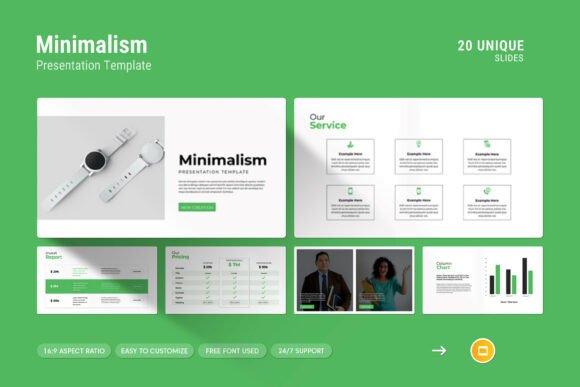
At first glance, minimalist design might seem simple to pull off. In practice, it takes careful thought to remove clutter while keeping the slide functional. This template strikes a good balance. It includes twenty slides, each built around a clean layout that prioritizes content over decoration.
One of the strongest features is the master slides layout. Instead of adjusting each slide individually, you can make changes once and apply them across the entire deck. If you need to update a color scheme or tweak a header style, it takes seconds rather than hours. That kind of efficiency matters when you are working under a tight deadline.
The template also supports drag and drop for images. You do not need to resize, crop, or reposition every photo manually. Just drop in your visual, and the layout adjusts automatically. This is especially helpful if you are not a design expert but still want your slides to look polished.
Key characteristics worth noting
- Works on both Apple and Windows devices without compatibility issues.
- Full HD 16:9 ratio (1920x1080 pixels), which is the standard for most modern screens and projectors.
- Easy color changes so you can match brand guidelines or personal preferences.
- Includes infographics, tables, diagrams, and vector icons for visual variety.
- Uses free fonts, so there are no extra licensing costs or download hurdles.
These features may sound basic, but they solve real problems. How many times have you opened a template only to find missing fonts or distorted images? This template avoids those headaches by keeping everything editable and compatible.
Practical Applications Across Different Settings
The beauty of a minimalist template is that it does not lock you into one type of presentation. The same deck can work for a boardroom meeting, a classroom lecture, or a pitch to potential investors. Here are a few realistic scenarios where this template shines.
Business and corporate presentations
If you are presenting quarterly results, a new strategy, or a company update, you want your data to speak clearly. The template includes table layouts and infographic elements that let you present numbers without overwhelming your audience. You can drop in a bar chart or a simple diagram to illustrate trends, keeping the focus on the insights rather than the design.
I have seen teams spend hours trying to make their company profile look professional. With this template, you get a clean structure from the start. You can add your logo, adjust the color palette to match your brand, and fill in your content without worrying about alignment or visual consistency.
Educational and training materials
Teachers, trainers, and educators often need slides that are easy to follow. A cluttered slide distracts students and makes key points harder to remember. The minimalist approach here keeps text readable and visuals purposeful. You can use the diagram slides to explain processes step by step, or the photo layouts to showcase case studies or real-world examples.
For online courses or webinar presentations, the clean design also works well on smaller screens. Attendees watching on laptops or tablets will not struggle to read small text or decipher busy backgrounds.
Creative portfolios and personal projects
Freelancers, photographers, designers, and artists often need to present their work in a way that feels professional without being stiff. The creative photo layouts in this template let you display images prominently while keeping the overall look understated. That is a hard balance to achieve if you are building slides from scratch.
If you are pitching a creative concept to a client, the vector icons and infographics can help you explain your vision without relying solely on text. The template gives you room to be visual without going overboard.
Marketing and pitch decks
When you have a few minutes to convince someone to invest or collaborate, every slide counts. This template helps you structure your story logically. You can use the diagram slides to map out a business model, the table layouts to compare options, and the image slides to show product shots or team photos.
The 20-slide format is generous enough to cover your main points without forcing you to cram everything into too few slides. At the same time, minimalist design encourages you to be concise, which is exactly what a pitch deck needs.
Usability and Efficiency Benefits
One of the most underrated aspects of a good template is how much time it saves. When you start with a prebuilt structure, you skip the blank-slide anxiety and the tedious formatting work. This template is fully editable, meaning you can adjust almost anything to fit your needs.
The easy color change feature deserves special mention. Many templates make you hunt through menus to change colors. Here, the process is straightforward, and because the master slides are set up properly, your changes propagate consistently. That alone can cut your prep time in half.
Another practical benefit is the drag and drop picture replacement. If you have ever spent minutes trying to align an image inside a shape or frame, you will appreciate how smooth this is. Just drop your photo in, and it snaps into place. It sounds simple, but it reduces friction significantly when you are building a deck under time pressure.
What about the help file?
The template includes a help file that walks you through the basics. If you are new to Google Slides or unfamiliar with master slides, that documentation can save you from common mistakes. I recommend glancing at it before you start customizing, especially if you plan to make major layout changes.
Considerations Before You Start
No template is perfect for every situation. Here are a few practical things to keep in mind when using this one.
- Think about your content first. Minimalist design works best when you have strong visuals or concise text. If your slides are packed with dense paragraphs, even a clean layout will feel busy. Edit your content to match the template, not the other way around.
- Test the fonts. The template uses free fonts, which is great for accessibility. However, if you collaborate with others, make sure they also have those fonts installed or that the slides render correctly in Google Slides online.
- Use icons purposefully. Vector icons are included, but resist the urge to add them everywhere. One icon per key point is usually enough. Too many icons can make a slide feel noisy.
- Check your images. Because the template relies on clean visuals, low-resolution or poorly cropped photos will stand out. Use high-quality images that match the professional tone of the design.
Why This Template Works for Non-Designers
Not everyone has an eye for layout, spacing, or color theory. That is where this template becomes especially valuable. It makes design decisions for you, so you do not have to think about margins, alignment, or font pairing. You can focus entirely on your message.
At the same time, experienced designers will appreciate the flexibility. The slides are easy to customize, and the master slide structure means you can build your own variations without breaking the template. Whether you are a beginner or a seasoned pro, the template adapts to your workflow rather than forcing you to adapt to it.
Final Thoughts on Getting the Most Out of It
The Minimalist Google Slides Template is not trying to reinvent the wheel. It is a solid, well-built tool that removes the common frustrations of presentation design. If you need a professional deck quickly and want it to look clean across different devices and platforms, this is a reliable option.
I suggest starting by mapping out your content first, then choosing which slide layouts fit each section. Use the infographics and diagrams to break up text-heavy slides. Keep your color palette simple, and let the template do the heavy lifting on layout.
When you finish, test your slides on a projector or external monitor if possible. The 16:9 ratio works well on most screens, but seeing it in the actual presentation environment helps you catch any issues with contrast or readability.
At the end of the day, a presentation is about communication. This template helps you communicate more clearly by getting out of the way. That is the real value of good minimalist design.